


Meta description: Millwork shop drawings determine whether fabrication starts on time or stalls in review. Learn what a complete submittal package includes, how architects review it, and what causes revise-and-resubmit comments.
The email usually arrives after award, not during estimating. The GC issues the submittal log. One line reads: millwork shop drawings required prior to fabrication. That’s the moment many small shops realize commercial work doesn’t run on marked-up bid elevations and cabinet software screenshots.
In residential work, a good shop can often build from experience, field notes, and direct conversations. In commercial work, that approach breaks down fast. The architect wants a formal submittal. The GC wants revision tracking. The installer wants coordinated dimensions. If the package comes back with comments, fabrication waits while the clock keeps moving.
That’s why millwork shop drawings aren’t just drafting output. They are the fabricator’s formal statement of what will be built, where it goes, what materials are proposed, and how the work aligns with the contract documents. If you treat that package like paperwork, you’ll lose time in review. If you treat it like a production control document, you protect margin and keep the schedule moving.
The Business Case for Flawless Millwork Shop Drawings
Commercial millwork lives in a large and demanding market. The U.S. millwork industry recorded $9.0 to $9.7 billion in annual shipments in the early 1990s, with 48% of shipments tied to new private construction and 47% tied to repair and remodel, according to historical U.S. millwork industry data published by CINTRAFOR. That scale matters because it reflects how much work depends on precise handoff between architect, fabricator, and installer.
A poor submittal slows that handoff immediately. The GC can’t release fabrication confidently. The architect can’t confirm design conformance. The shop can’t lock materials, hardware, and production sequencing without risking a mismatch later. Every one of those delays shows up in labor burn, schedule compression, or field fixes.
Why the submittal carries contractual weight
Under standard AIA contract language, shop drawings are not casual reference sketches. They are contractor-prepared drawings that show how part of the work will be executed. For millwork, that means the drawing set becomes the fabricator’s execution package. It shows dimensions, materials, hardware, interfaces, and assumptions.
The architect’s review is limited. They’re checking conformance with design intent, not taking over responsibility for fabrication means and methods. Shops that misunderstand that point often submit too little detail, expecting the reviewer to fill in the gaps. That never ends well.
Practical rule: If a reviewer has to guess what you intend to build, you have not submitted a complete package.
What first-pass approval really protects
A clean submittal does three jobs at once:
- Protects schedule: Fabrication can start with fewer decision gaps.
- Protects margin: The shop spends time building, not redrawing.
- Protects accountability: Scope, materials, and interfaces are documented before cut lists and purchasing move forward.
That’s the business case. Good millwork shop drawings don’t exist to impress the architect. They exist to reduce avoidable friction before the work reaches the floor.
Architectural Intent vs Fabrication Intent
The fastest way to get a submittal rejected is to confuse the architect’s drawing with the fabricator’s drawing. They are related, but they serve different purposes.
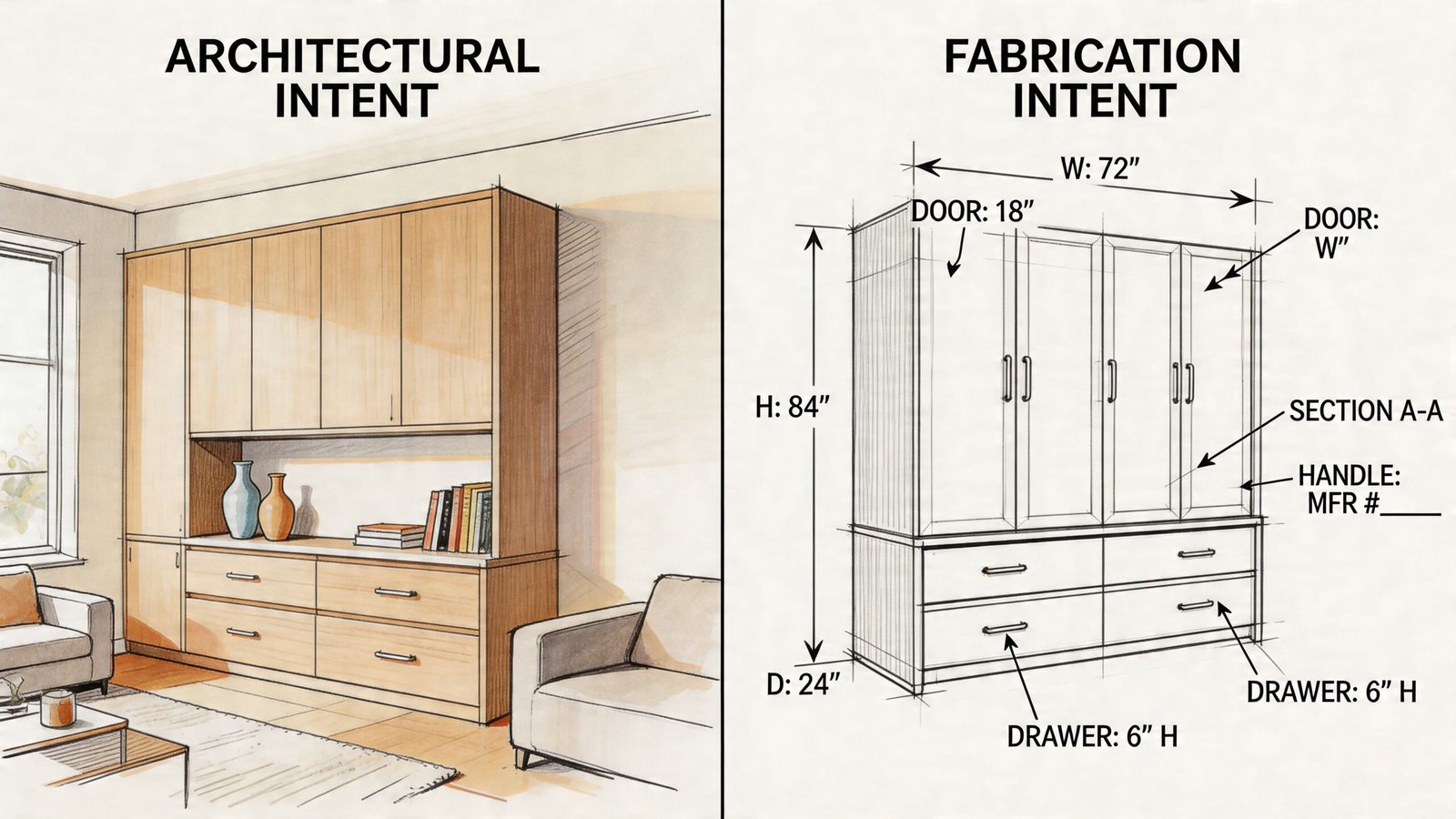
Millwork shop drawings have deep roots in production. During the Golden Age of millwork, circa 1880 to 1910, mechanized manufacturing expanded the use of complex architectural woodwork, and shop drawings became the bridge between design and factory output, as outlined in this history of millwork and its drafting role. That same division still governs commercial work now.
What the architect shows
Architectural drawings show design intent. They define the look, location, proportions, material expectations, and relationship to surrounding construction. They are part of the contract documents.
They usually do not show fabrication logic. You won’t get everything needed for shop production from an interior elevation alone. It may show a panel layout and finish note, but not substrate build-up, edge treatment, attachment strategy, or hardware rough-in logic.
What the fabricator shows
Shop drawings show fabrication intent. They answer the question the architectural set intentionally leaves open: how will this be built and installed while still matching the design concept?
A proper fabricator package shows things such as:
- joinery and assembly logic
- substrate and face material decisions
- hardware locations and product references
- section cuts through critical conditions
- dimensional control at interfaces with walls, floors, and adjacent trades
If you need a clearer baseline on the distinction, this short guide on what shop drawings mean in practice is worth reviewing before building your package standards.
The redrafted-elevation trap
A lot of first-time commercial submittals fail because they add almost nothing beyond the architect’s own sheet. The fabricator traces the elevation, adds a few dimensions, and sends it in. From the reviewer’s side, that package has no production value.
A shop drawing that simply repeats the contract drawings is not a submittal. It’s evidence that the shop hasn’t translated design into fabrication yet.
The architect already knows what they drew. What they need to see is your proposal for executing it.
Why AWI Standards Govern Your Millwork Submittal
In U.S. commercial woodwork, the standard that matters is AWI. If the project spec references architectural woodwork requirements, your drawing package has to show compliance in a way the reviewer can verify quickly.
That matters because AWI doesn’t only speak to finished appearance. It also shapes what belongs in the submittal package and how clearly the package communicates grade, materials, and install intent.
What AWI expects in the package
A complete submittal under AWI practice includes more than drawings. It includes product data, material samples, and site-specific installation plans, and one industry reference notes that consistent AWI-based documentation can reduce rework by 30% to 50% by cutting miscommunication between architect, GC, and fabricator, as described in this summary of AWI-driven millwork drawing requirements.
For a shop stepping into commercial casework, that requirement changes the whole mindset. You are not sending a drawing for courtesy review. You are assembling a documented compliance package.
The grade has to show up in the details
AWI aesthetic grades matter because they change what the reviewer expects to see in the drawing. If the project requires Economy, Custom, or Premium, your sections, details, and material schedule must support that level.
A few practical examples:
| AWI issue | What the reviewer expects to see |
|---|---|
| Required grade | Notes and details that align with the specified quality level |
| Exposed surfaces | Higher-grade finish materials identified clearly |
| Semi-exposed surfaces | Interior-facing materials called out accurately |
| Concealed surfaces | Lower-visibility materials still documented, not left vague |
If the specification calls for one level and your submittal reads like another, the review stalls immediately. The architect may not rewrite the package for you, but they will send it back.
Surface categories are not optional notes
Exposed, semi-exposed, and concealed surfaces need real definition in the drawing set. That usually shows up in section cuts, material schedules, and keyed notes.
What doesn’t work is vague language like “plywood throughout” or “match finish as selected.” Those notes tell the reviewer almost nothing. A commercial reviewer needs enough information to compare your package against the specification without making assumptions.
The cleanest millwork submittals are the ones where grade, surface condition, and material logic all agree with each other sheet to sheet.
For shops used to direct owner approvals, this is often the biggest adjustment. In commercial work, undocumented assumptions get treated as unresolved scope.
Anatomy of a Submittal-Ready Drawing Package
A solid package reads in sequence. The reviewer should be able to move from project context to room location, from elevation to section, from section to material schedule, without hunting.
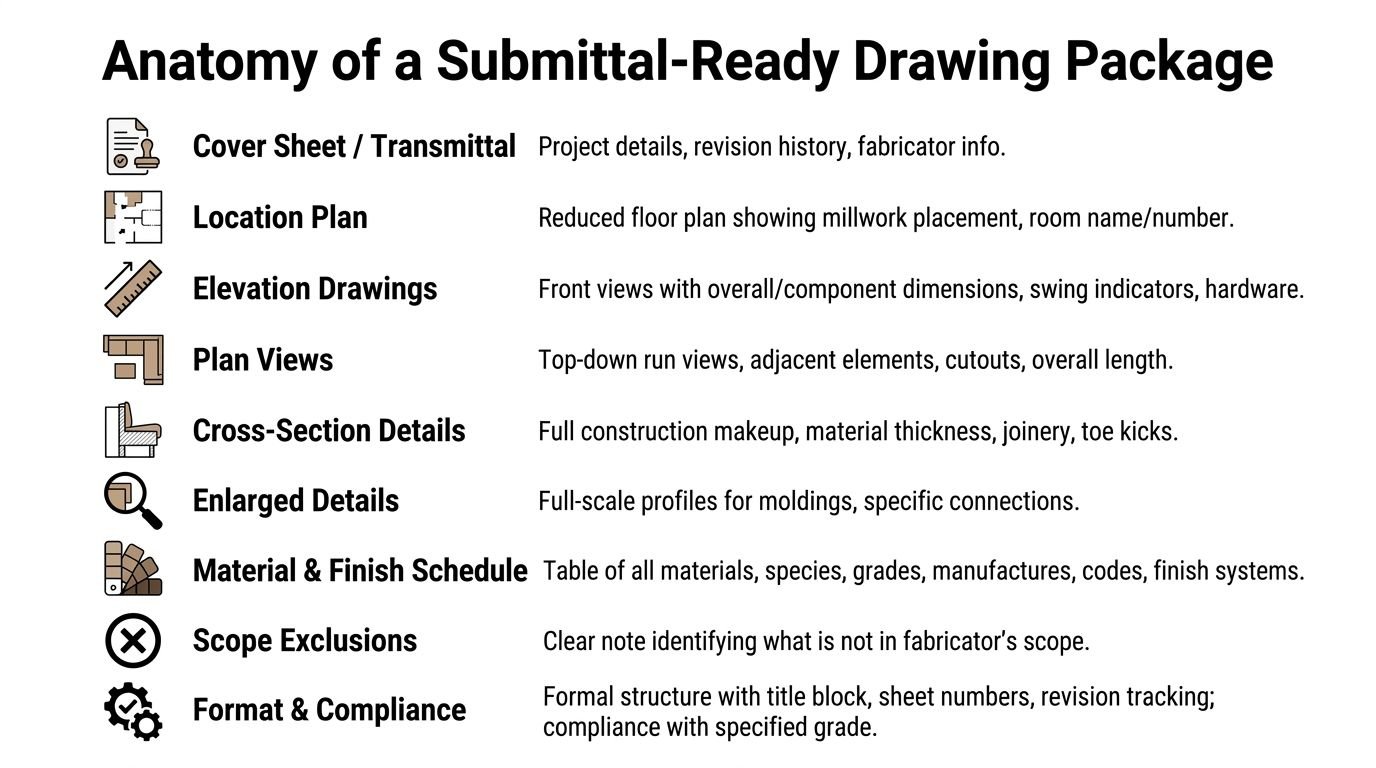
Good drafters also work from a stable production method. Standardized CAD layers and reusable blocks can cut drafting time by hours, and experienced teams typically anchor the set with the plan view first so elevations and sections align vertically and don’t create dimensional conflicts that trigger rework, as explained in this practical guide to millwork drawing production. If you want to compare against a polished output, review a shop drawing example used in professional production workflows.
Cover sheet and transmittal discipline
The cover sheet tells the reviewer whether the package is under control before they even study the details.
It should include:
- Project identification: project name, address if required, GC, architect, and millwork fabricator
- Submittal information: submittal number, revision number, and date
- Drawing index: every sheet in the package listed in order
- Status control: revision block that updates every time the package changes
- Fabricator identification: company name, contact, and internal reference if used
A missing revision block is a warning sign. So is inconsistent sheet numbering. Commercial reviewers notice that immediately because poor document control usually means poor revision control later.
Location plan and room mapping
Before elevations, give the reviewer orientation. A reduced plan with room names and room numbers prevents unnecessary review comments and saves time on both sides.
The location plan should show:
- Room names and numbers: exactly as used in the architectural set
- Wall references: if the design team uses wall tags, match them
- Unit tags: BC-01, WC-02, RCP-01, or whatever your office standard is
- Millwork extents: enough graphic clarity to identify each run or standalone unit
A reviewer shouldn’t have to search through the architectural set to figure out where your drawing belongs.
Elevations that can actually be reviewed
This is the heart of the millwork shop drawing submittal. Every elevation should show the installed front view exactly as proposed.
At minimum, each elevation needs:
- Overall dimensions: height, width, and depth
- Breakdown dimensions: door leaves, drawer fronts, shelf openings, panel zones
- Swing information: handing and direction where applicable
- Hardware references: pulls, hinges, locks, slides, plus manufacturer and model references in the schedule
- Reveal logic: panel joints, shadow lines, fillers, scribes, and toe kick offsets
- Section markers: callouts that lead the reviewer into larger-scale details
- Location references: room name, room number, and wall designation
- Unit identification: tag each casework unit clearly
One of the most common misses is the reveal pattern. The architect may have drawn a deliberate shadow line, but the fabricator’s software defaults to flush conditions. If the drawing doesn’t show the reveal, the reviewer will catch it.
Field note: If your elevations look clean but your sections don’t explain how those faces are built, the package is only half done.
Plan views that catch coordination early
Plan views are where practical conflicts show up. A base cabinet run may look fine in elevation and still collide with a floor box, plumbing offset, or column wrap.
Use plan views to show:
| Item | Why it matters |
|---|---|
| Overall run length | Confirms layout against room geometry |
| Distance to adjacent construction | Prevents drift against walls and openings |
| Cutouts and penetrations | Coordinates sinks, equipment, access panels |
| Clearances | Helps review door swings and service zones |
| Field verification notes | Flags dimensions that must be confirmed before release |
If a dimension hasn’t been field-verified, say so clearly. Don’t bury that note in fine print.
Cross-sections that prove compliance
Sections do the hard work. Within them, you show the build-up, not just the appearance.
A useful section set typically identifies:
- Substrate type and thickness
- Face material and finish layer
- Edge banding type and width
- Shelf, back, and bottom construction
- Toe kick assembly
- Attachment or connection logic
- Relationship to adjacent wall, floor, or ceiling condition
Commercial reviewers often look here first when they suspect the package is light on substance. If your sections are generic, they’ll assume the rest of the package may be generic too.
Enlarged details and full-scale profiles
Complex conditions need their own sheet space. Crown profiles, stile-and-rail conditions, integrated lighting valances, glass frame sections, and special trim intersections should not be left to notes on a crowded elevation.
These details usually answer the questions that cause back-and-forth later:
- What exactly is the molding profile?
- How does the light valance return?
- What’s the frame build-up at glass?
- Where does the hardware mount relative to the edge condition?
For custom architectural woodwork shop drawings, these enlarged views often separate a mature package from a weak one.
Material schedule and scope boundaries
The material and finish schedule is where the submittal becomes reviewable against the written spec.
It should identify, as applicable:
- Substrate species and grade
- Face veneer species, cut, and grade
- Laminate manufacturer and product code
- Edge treatment and thickness
- Hardware manufacturer and model number
- Finish system references and sheen
- AWI grade alignment where required
Then add scope exclusions. Keep them plain and direct. Note what is not included, such as countertops by others, appliances by others, glazing by others, plumbing fixtures by others, or electrical devices by others.
That note protects everyone. It also keeps the review focused on the millwork fabricator’s actual scope instead of drifting into adjacent trades.
Inside the Architect's Review What Triggers a Rejection
Architects review shop drawings with a narrow purpose. They are checking whether your submittal matches the design concept and the contract requirements. They are not taking responsibility for your fabrication dimensions, shop methods, or production sequencing.
That distinction matters because many fabricators think review comments are asking for “more information” in a general sense. Usually they are pointing to one of a small set of failures: the package doesn’t match the design, doesn’t show compliance, or doesn’t define scope clearly enough to approve.
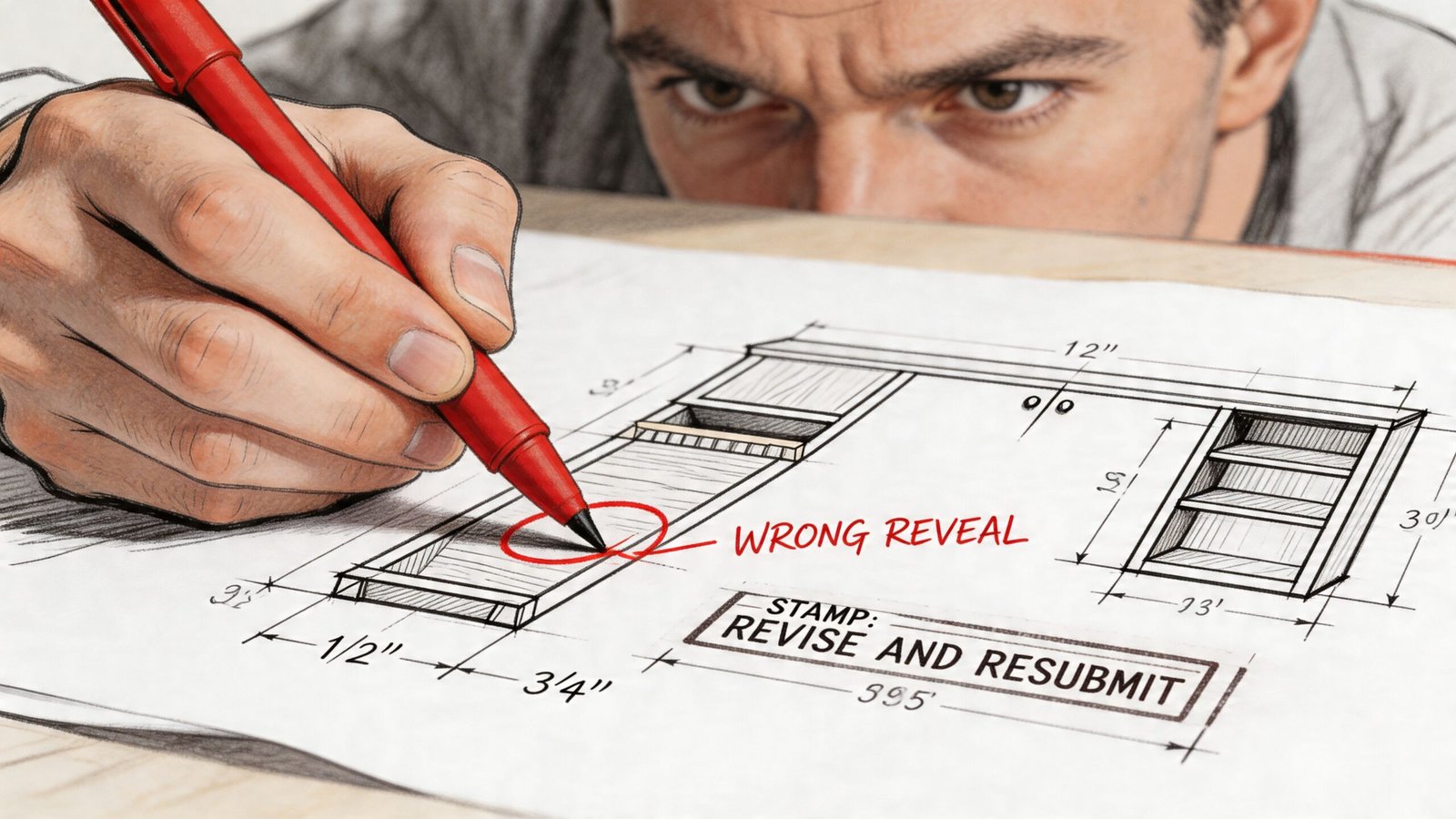
If your team wants a stronger baseline for what review-ready packages look like, this overview of shop drawing production and review workflows is a useful reference point.
What the reviewer is actually checking
On a real project, the architect’s review usually centers on five things:
- Design conformance: do proportions, panel layout, reveals, and visible hardware locations match the design intent?
- Specification compliance: does the material schedule align with what Division 06 requires?
- Dimensional consistency: do your dimensions make sense against the architectural background and room conditions?
- Trade coordination: does your work interfere with electrical, plumbing, HVAC, or structure shown in the contract set?
- Scope clarity: can the reviewer tell exactly what you are furnishing and what is by others?
That’s why a sparse package creates so much trouble. It leaves too many of those checks unanswered.
The red-flag checklist
Most revise-and-resubmit outcomes come from a handful of recurring mistakes.
No room location
If the sheet doesn’t clearly say which room and wall the unit belongs to, the reviewer loses time just orienting themselves. That often triggers comments before the technical review even starts.
Scaled dimensions instead of verified dimensions
A drawing built from scaled PDF geometry instead of confirmed dimensions is easy to spot. Runs don’t close cleanly, fillers look arbitrary, and adjacent conditions don’t line up.
Incomplete material schedule
“White oak veneer” is not enough. The reviewer needs a schedule they can compare against the spec. If key material, finish, or hardware references are missing, approval stalls.
Missing reveals and joint logic
Flush joints shown where the design intended shadow lines is a classic issue. So is omitting scribe conditions at walls or failing to show toe kick recesses consistently.
Hardware shown vaguely or not at all
If the hardware schedule exists in the contract set and your drawings ignore it, you’ve left a major review item unresolved.
Scope drift
If it’s unclear whether your package includes countertops, backing, trim returns, glass, or accessories, the reviewer has to ask. That uncertainty often leads to rejection rather than conditional approval.
A reviewer can tolerate a minor notation issue. They won’t approve a package that leaves them guessing about materials, geometry, or scope.
What gets approved faster
The best submittals are easy to mark up because they are easy to read. They show design conformance without drama. They give enough fabrication information to confirm compliance. They identify assumptions before the reviewer has to uncover them.
That is the point of a disciplined millwork fabricator shop drawings review process. You want the architect spending time confirming your work, not decoding it.
The Millwork Submittal Lifecycle From Draft to Approval
Commercial submittals move through a tracked chain. Shops that are new to the process often think the drawing is the work. It isn’t. The workflow around the drawing is what determines whether approval happens cleanly.
Preparation before anything gets sent
Start with the contract set, finish schedules, hardware information, and every issued addendum. Then layer in field information as soon as it’s available.
If dimensions are not yet confirmed, label affected conditions accordingly. Don’t present unverified dimensions as final. That only creates another cycle later.
A disciplined preparation phase usually includes:
- review of architectural and interior sheets
- review of specification requirements
- field measurement or field verification plan
- internal QA for dimensions, tags, and sheet coordination
- packaging into a formal submittal set
Submission and review flow
The fabricator normally submits to the GC, not directly to the architect. The GC logs the package, checks routing, and forwards it for review.
The review period is often stated in the contract. A common benchmark is 14 days, though actual timing depends on project terms and current submittal load. During that window, the architect reviews for design conformance and may coordinate comments from the interior designer, consultant, or owner representative.
The three responses that matter
Teams will typically see one of three outcomes:
| Review status | What it means | What the fabricator should do |
|---|---|---|
| Approved | Work may proceed | Release fabrication using the approved set |
| Approved as Noted | Work may proceed with incorporated comments | Revise internal production set to include notes before release |
| Revise and Resubmit | Work may not proceed | Correct package and send a new formal resubmittal |
“Approved as Noted” is where shops get into trouble. They see the word approved and start cutting material without absorbing every comment. If the notes affect hardware, reveals, species, or dimensions, your production set has to be updated first.
Revision tracking is part of the work
Cloud changes. Date them. Log them. Use deltas or another clear revision marker.
When a reviewer opens the second package, they should be able to find every changed condition quickly. If they have to compare two PDFs line by line, they will either miss something or return comments asking for cleaner revision identification.
Reviewers don’t mind revisions. They mind revisions that are hidden.
After approval
Once the set is approved or approved as noted, that stamped package becomes the fabrication instruction baseline. If a field change appears later, process it properly. Don’t treat site-driven changes as casual verbal adjustments.
For casework shop drawings commercial projects, that discipline is what keeps the approved record aligned with what gets built and installed.
Common Pitfalls for First-Time Commercial Fabricators
The first commercial package often reveals exactly where a residential workflow stops being enough.
Raw software output sent as a submittal
Cabinet Vision, KCDw, and similar tools are useful production platforms. Their default views are not, by themselves, a formal submittal set. If the output lacks title blocks, coordinated notes, sheet numbering, and revision control, the package reads as unfinished.
Final dimensions issued before field verification
Architectural backgrounds are a starting point, not a release-to-build condition. If the room is still moving or field conditions aren’t confirmed, the drawing needs that limitation called out clearly.
Material descriptions that are too loose
“Maple ply” might work in a shop conversation. It doesn’t work in a commercial review environment where the architect has to compare your proposal against specified requirements.
No scope exclusions
If the drawing doesn’t say what’s by others, that silence creates risk. In a dispute, undocumented exclusions rarely help the fabricator.
One oversized package for everything
Large all-in-one submissions often backfire. If some rooms are ready and others depend on pending field information, splitting the package is usually cleaner. Otherwise, items that could move forward get trapped with items that are not ready.
These mistakes don’t just delay approval. They tell the GC and architect that the shop may not yet have commercial document control under control.
Scaling Your Drafting Capacity Without In-House Hires
A lot of capable millwork shops don’t have a fabrication problem. They have a production bandwidth problem.
The same person may be estimating, answering RFIs, coordinating hardware, updating field notes, and trying to produce AWI millwork shop drawings late at night. That arrangement can work on a small custom job. It breaks down when several commercial packages need to move at once.

There’s another complication. The industry still lacks clear guidance on how traditional 2D millwork documentation should integrate with BIM-based coordination, as noted in this discussion of the gap between classic shop drawings and modern BIM workflows. That gap creates extra pressure on shops that can build well but don’t have a mature documentation system.
What a production partner should actually solve
The right external drafting support shouldn’t just “draw faster.” It should improve production control.
Look for a partner that can support:
- Template discipline: consistent title blocks, sheet logic, notes, and revision standards
- QA workflow: internal checks before the package reaches the GC
- BIM awareness: ability to coordinate against model-based project information when needed
- Scalable delivery: capacity to handle multiple rooms, packages, or project phases without document chaos
What doesn’t solve the problem
Throwing raw drafting labor at the issue usually creates another issue. If the external team doesn’t understand architectural review behavior, AWI-driven detail expectations, and commercial submittal structure, the output still comes back for revision.
The gain comes from process maturity. The shop keeps its internal focus on fabrication, purchasing, and installation prep while the drawing workflow stays controlled and reviewable.
That’s the practical value of an outside production resource. Not extra hands. Better document reliability.
From Drawing Board to Profit Center
Shops that treat millwork shop drawings like overhead usually end up paying for that decision in delay, rework, and strained GC relationships. Shops that treat them like production control tools usually get a different result. Fewer review comments, clearer releases, and less confusion between approval and fabrication.
The payoff isn’t abstract. It shows up in calmer release meetings, cleaner purchasing decisions, and fewer calls from the field asking what the drawing was supposed to mean. That’s why strong millwork shop drawing requirements are worth standardizing internally, even if your project mix is still growing into commercial work.
Reliable submittals also build reputation. Architects remember fabricators whose packages are complete. GCs remember shops that don’t stall the log with avoidable revisions. Over time, that consistency becomes a business advantage.
If your team wants a second set of eyes on its millwork documentation process, or needs help producing commercial-grade submittal packages, BIM Heroes is a practical place to start. The conversation doesn’t need to begin with a sales pitch. It can begin with your current template, your review pain points, or the package that keeps coming back with comments.