The future of BIM isn't about replacing skilled professionals with AI; it's about accelerating disciplined workflows with intelligent automation. The noise around AI is constant, but the reality for architects, BIM managers, and VDC leads is simple: technology amplifies what’s already there. It makes good systems great, and it makes bad systems fail faster and at a much greater scale.
This isn't a tech blog. It's a production reality check. AI and automation won’t fix broken standards or unclear processes. They will, however, expose which firms actually have systems worth accelerating.
1. AI and Automation: A Grounded Look at What’s Really Changing
For every VDC lead and operations team, the conversation around AI often feels disconnected from the day-to-day realities of project delivery. The truth is far more practical.
AI and automation are not magic wands. They won't fix broken BIM standards, inconsistent templates, or chaotic workflows. In fact, they do the exact opposite. We’ve seen automation succeed only when it’s layered onto well-defined BIM and VDC processes.
Think of it as an amplifier. Firms already strong in BIM governance, QA/QC processes, LOD planning, and coordination are the ones who benefit first. For them, AI offers a direct path to greater predictability and better margin protection. For everyone else, it’s a fast track to exposing every crack in their production system.
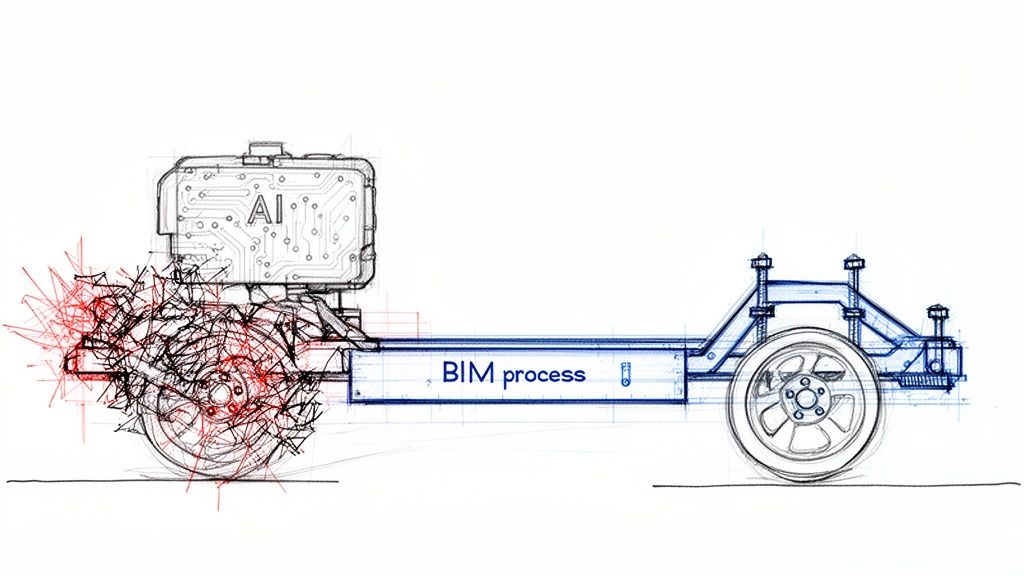
This diagram shows how AI acts as that amplifier, turning a broken process into a liability while turning a strong, disciplined process into a high-performance asset.
The key takeaway is that technology doesn’t create discipline; it rewards it.
The Real Momentum Behind AI in BIM
This shift isn’t just theoretical—it’s backed by serious market momentum. The global BIM market is projected to grow from USD 9.88 billion in 2025 to USD 28.2 billion by 2035.
Even more telling, AI-driven BIM solutions are expected to capture over 40% of the market share by 2026. Automation in clash detection and predictive analytics is already showing it can cut rework by up to 30%.
This growth reflects a demand for operational consistency and reliable delivery. The conversation is moving beyond simple 3D modeling and toward creating structured data environments that support the entire project lifecycle. This includes leveraging data long after handover, like using AI diagnostics for predictive maintenance in smart buildings.
The core message for production leaders is simple: AI and automation won’t replace your VDC team. They will, however, expose which firms actually have systems worth accelerating.
This reality forces a critical question for every operations team: is your CAD-to-BIM evolution built on a foundation that’s ready for automation? Or will new tools simply highlight existing process gaps? Understanding the practical applications and limitations of AI in BIM is the first step toward a more predictable future.
AI in BIM and VDC Reality Check
It's easy to get lost in the hype. This table cuts through the noise to show where AI is genuinely making a difference today versus where experienced human judgment remains absolutely essential.
| Area of Impact | Where AI Is Accelerating Workflows | Where Human Judgment Is Irreplaceable |
|---|---|---|
| Design Generation | Generating hundreds of massing studies and layout options based on defined constraints. | Interpreting client needs, aesthetic vision, and contextual nuance that can't be quantified. |
| Clash Detection | Automatically identifying and flagging geometric conflicts between MEP, structural, and architectural models. | Prioritizing clashes based on constructability, cost impact, and project schedule. Not all clashes are equal. |
| Cost Estimation | Performing rapid quantity takeoffs and generating preliminary cost estimates from model data. | Validating estimates against real-world market conditions, labor costs, and supply chain variables. |
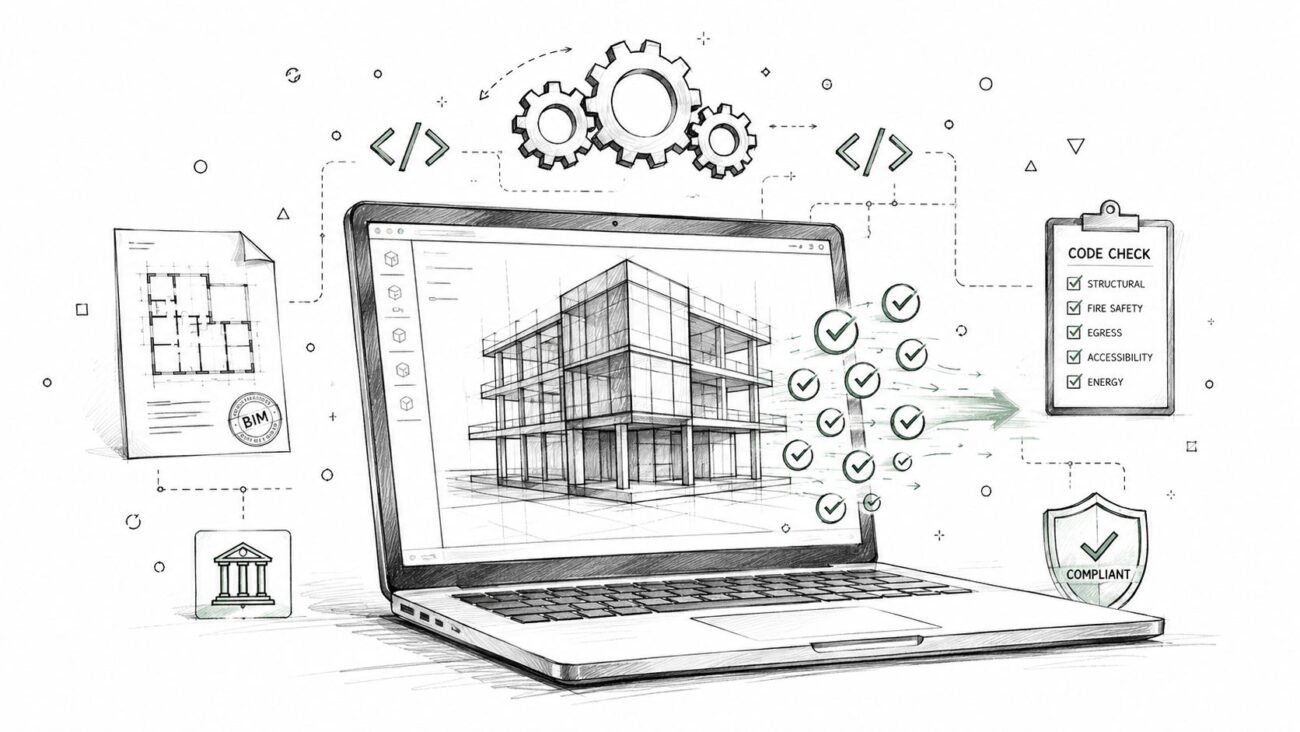
| Code Compliance | Running automated checks against standardized building codes and project-specific rule sets. | Navigating ambiguous code interpretations, negotiating with local authorities, and making strategic design trade-offs. |
| Project Scheduling | Optimizing construction sequences and predicting potential delays based on historical data. | Responding to unforeseen site conditions, managing subcontractor relationships, and making real-time decisions. |
Ultimately, AI is becoming an incredible co-pilot for VDC teams. It handles the repetitive, data-heavy lifting, freeing up your experts to focus on the high-value strategic thinking that drives successful project outcomes.
Why AI Cannot Fix a Broken BIM Process
The buzz around AI and automation in VDC is electric, but it’s easy to get ahead of ourselves. Too many firms jump at new tech as a silver bullet for production bottlenecks, hoping an algorithm can magically untangle inconsistent models or chaotic workflows. That's a recipe for expensive failure.
Think of AI as a high-performance engine. An engine is useless without a well-built car—it needs a solid chassis, a reliable transmission, and a steering system that responds. In our world, your BIM and VDC process is that car. AI can’t invent a destination; it can only get you to where you're already headed, faster.
An AI tool can't interpret a vague scope of work, clean up a messy model riddled with undefined parameters, or guess the logic behind a poorly documented workflow. It just executes instructions with brutal efficiency—which means it will execute bad instructions just as quickly as good ones.
The Prerequisite for Automation is Discipline
The future of BIM isn't about buying the flashiest AI software; it’s about having a production system mature enough to handle it. Before you even think about scaling with automation, you need to have the non-negotiable foundations locked in. These aren't just "best practices"—they are the decision checkpoints and QA processes that prevent RFIs and protect margins.
Successful automation in VDC depends entirely on:
- Robust BIM Execution Plans (BEP): An AI can’t make judgment calls where a BEP is fuzzy. It needs crystal-clear standards for naming conventions, model origin points, and data exchange protocols. A tight BEP is the rulebook the automation script lives by.
- Strict Template Discipline: If every project kicks off with a slightly different template, you’re baking in downstream chaos that no algorithm can fix. Consistent, clean, and lean project templates ensure automated routines find what they expect, where they expect it, every single time.
- Clear Level of Development (LOD) Planning: Automation feeds on predictable model data. If your LOD matrix is just a checkbox exercise and teams are modeling elements with inconsistent detail, an AI script for quantity validation or clash filtering will spit out garbage.
- Rigorous QA/QC Processes: Automation doesn’t replace the need for quality assurance; it makes it even more critical. Automated model checks are powerful, but they need a human-led QA process to define the rules, validate the outputs, and handle the exceptions.
AI doesn’t solve ambiguity. It punishes it. The firms that will win with AI are those where "how we work" is a documented, repeatable system, not just tribal knowledge.
Amplifying Good Habits Not Bad Ones
When a firm with disciplined systems brings in automation, the benefits are immediate and they compound. An automated script checking model health against a strict company standard saves hundreds of hours and prevents downstream errors. A rule-based clash detection filter, built on a clear LOD plan, helps teams zero in on real constructability issues instead of drowning in thousands of false positives.
But try to apply automation to a chaotic CAD-to-BIM evolution, and you just create a mess at high speed. Imagine running an automated drawing generation script on a model with no view template discipline. You get a thousand consistently wrong drawings in minutes. This is why operational consistency is the true key to unlocking future tech.
The hard truth is that investing in AI in BIM forces a moment of reckoning. For firms that have put in the work to build scalable delivery pods and mature production systems, automation is a natural and powerful next step. For others, it’s a clear sign that the foundational work has to come first.
To learn more about this foundational document, explore our guide on creating effective BIM Execution Plans.
Practical Automation You Can Use in VDC Today
Let's ground this conversation in reality. The most valuable discussion about the future of BIM isn't some ten-year forecast; it's about the automation in VDC that adds real value to your projects right now. Hype doesn't protect your margins, but smart automation absolutely can.
These tools aren't coming for anyone's job. They're here to augment your sharpest minds, freeing them from repetitive tasks so they can focus on what they do best: solving complex coordination puzzles and leading constructability reviews.
The goal is targeted acceleration, not total replacement. Automation shines where the rules are clear and the work is repetitive.
Where Automation Is Already Winning
For firms with mature BIM workflows, automation is no longer a futuristic concept—it’s a competitive advantage. These are tools being put to work today to make project outcomes more predictable.
Here’s the low-hanging fruit where teams are getting immediate returns:
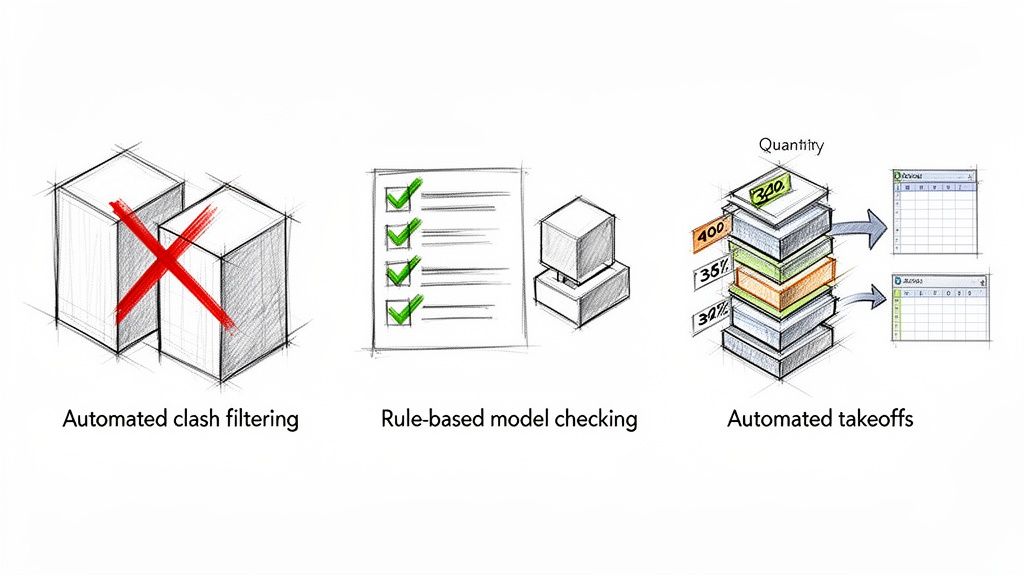
- Automated Clash Filtering: Instead of a coordinator manually digging through thousands of irrelevant clashes, scripts can automatically group, prioritize, and dismiss non-critical conflicts based on preset rules. This lets them focus on the 10% of clashes that actually threaten the schedule and budget.
- Rule-Based Model Checks: Think of this as an automated QA process. Scripts can run audits for compliance with your company's standards, checking everything from naming conventions to parameter completeness before a model ever leaves your office for permitting prep.
- Quantity Validation: If your model is well-structured, you can automate accurate quantity reports for concrete, steel, or drywall. This doesn't just save time; it slashes the human error that creeps into manual counts, giving your estimators more reliable data.
The point of automation isn’t to take humans out of the loop. It’s to make sure their time is spent making decisions, not doing data entry or mindless clicking.
This approach becomes even more powerful when you pair it with modern reality capture. The global BIM market is growing fast and is expected to hit USD 27.12 billion by 2034. A huge part of that growth is driven by laser scanning for creating precise as-built models, which has been shown to cut errors by up to 40%. Automating data extraction from those dense point clouds is a game-changer for renovation and retrofit projects.
Expanding Beyond the Obvious Wins
Beyond those core wins, automation is making its way into other critical tasks that directly impact project schedules and profitability. These applications show just how versatile AI in construction workflows can be when you apply it to specific, well-defined problems.
- Repetitive Drafting Automation: Think about all the time spent placing annotations, generating standard details, or creating sheet sets. Much of that can be scripted. For teams producing huge drawing packages, this is a massive recovery of billable hours. Check out our guide on mastering Dynamo scripts for Revit to see how it works.
- Drawing Consistency Checks: An automated script can scan an entire drawing set to make sure title blocks are filled out correctly, view titles are consistent, and detailing standards are applied uniformly. This is a QA task that is perfect for a machine—it’s tedious, rule-based, and critical for preventing embarrassing mistakes during permitting.
- Streamlined Data Extraction: Automation tools can pull specific data from models to populate schedules, door hardware sets, or equipment lists into Excel. This finally kills the "double entry" problem and ensures what’s in the model actually matches what’s on the drawings.
When it comes to practical automation that can be immediately applied in VDC today, tools like AI-powered exterior home design visualizer tools are also emerging as powerful solutions for streamlining the design process and enhancing client presentations. Each of these applications reinforces the core message: disciplined systems are the prerequisite for reaping the rewards of automation.
Where AI Still Struggles in Design and Construction
While it’s easy to get excited about what AI can do, a real conversation about the future of BIM means being honest about where the technology still comes up short. For every task AI is great at, there’s a whole universe of problems it can’t touch.
Understanding these blind spots is crucial for managing risk and setting expectations for automation in VDC. It also brings into sharp focus the irreplaceable value of an experienced human eye. AI is a fantastic calculator, but it can’t interpret intent or take responsibility for its work.
The Problem of Context and Nuance
Right now, AI really struggles with tasks that demand deep contextual understanding and judgment calls based on multiple factors. This is where human expertise isn’t just valuable—it’s essential.
Some of the biggest gaps for AI in construction workflows show up in areas like:
- Building Code Interpretation: An AI can easily check a model against a specific rule, like "all corridors must be at least 44 inches wide." What it can't do is understand the intent behind that code, navigate a tricky local amendment, or negotiate an alternative means and methods with a building official.
- Constructability Judgment: Real constructability review goes way beyond simple clash detection. It's asking, "Can the crew on-site actually build this detail?" or "Is there physically enough room to get a wrench in there to tighten that bolt?" That kind of thinking requires a gut-level understanding of sequencing and how trades actually work in the field.
- Complex Detailing Logic: Sure, AI can spit out a standard detail it’s seen a thousand times. But it can’t invent a clever new waterproofing solution for a one-of-a-kind facade intersection. That kind of creative problem-solving—blending physics, material science, and design intent—is still a uniquely human skill.
The Unsolved Issue of Accountability
Beyond the technical hurdles, there’s a much bigger issue: who owns the work? When an automated system generates a design, who is legally and ethically on the hook if something goes wrong? This question is a massive roadblock for AI in any high-stakes decision-making role.
The professional of record who signs and stamps the drawings is ultimately responsible for their content, regardless of how it was generated. AI is a tool, not a licensed professional.
This simple fact grounds the use of AI firmly in the world of augmentation, not replacement. A firm’s risk is always managed by keeping a qualified human in the loop to review, validate, and ultimately take ownership of anything an algorithm produces. You can't blame the software when an RFI points out a design flaw; the buck stops with the team.
It’s a critical distinction that shapes the responsible integration of AI in BIM. Until an AI can carry its own professional liability insurance, its role will always be to assist, never to decide.
How AI Will Evolve the Role of BIM Managers
One of the first questions around AI in BIM is personal: "Will a machine take my job?" The honest answer is no—but your role is absolutely going to change. The future of BIM isn't about eliminating skilled professionals; it's about elevating them.
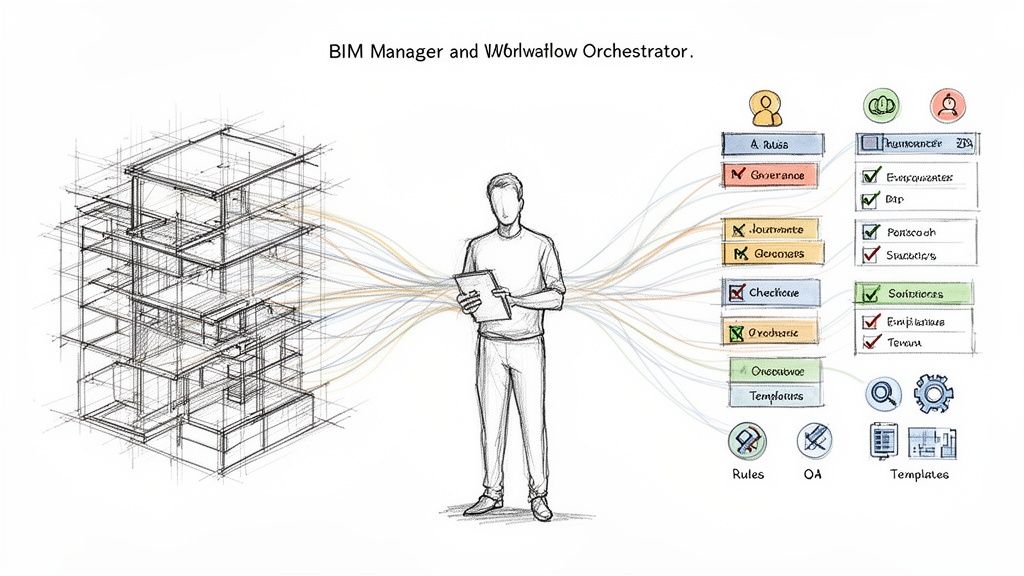
The days of the BIM Manager as a pure model manipulator are ending. Instead, their value is shifting from direct, hands-on intervention to system governance and workflow orchestration. Automation needs a conductor, and that’s the new core function of BIM leadership.
From Model Jockey to Workflow Orchestrator
In a highly automated environment, the most critical work happens before anyone runs a script. Forward-thinking BIM and VDC leads will spend less time in the model and more time designing the systems the model lives within. Their expertise becomes more valuable as they take on new strategic responsibilities.
This evolution carves out new roles:
- Workflow Architect: You can't automate what you haven't defined. This role is about mapping out and documenting the step-by-step processes that machines will execute.
- Data Strategist: This person ensures the model is structured to produce clean, reliable data for everything from quantity takeoffs to facility management, often leaning on principles from ISO 19650 and beyond.
- Quality Arbiter: The final human checkpoint for AI-generated work. They validate the results, catch nuances the machine missed, and ultimately own the quality of the final deliverable.
The core skill set is shifting from doing the task to designing the system that does the task. This moves BIM leaders from tactical problem-solvers to strategic enablers of production.
The Human-in-the-Loop Becomes More Critical
AI excels at speed and scale, but it has no judgment. As firms embrace more automation in VDC, the need for a seasoned expert to define the rules, train the systems, and make sense of the outputs becomes more important than ever.
With the global BIM market projected to hit USD 29.63 billion by 2035, this growth will demand more sophisticated lifecycle management. This shift elevates the BIM professional into a strategic data manager, keeping their expertise right at the heart of project success. You can explore the full BIM market analysis for a deeper dive into these numbers.
This reality reframes the whole conversation from "replacement" to "elevation." The most tedious, repetitive parts of the job—the very tasks that lead to burnout—are the first to go. This frees up BIM and VDC leaders to focus on high-value work that protects profit margins and delivers predictable outcomes, like improving QA/QC processes and preventing RFIs before they ever happen.
Your deep knowledge of design and construction reality is precisely what makes you indispensable. An AI can run a clash test, but it can't lead a coordination meeting. It can check a model against a standard, but it can't create the standard in the first place.
How to Prepare Your Firm for an Automated Future
The conversation about AI in construction isn't about some far-off future—it's about the decisions you're making right now. Bringing automation into your firm isn’t a technology problem. It’s a process problem. The firms that will pull ahead are the ones building disciplined, repeatable systems.
Before you can hit the accelerator, you need a solid foundation. Successful automation in VDC is built on clarity, consistency, and control. This means getting rid of "tribal knowledge" and creating documented workflows that a machine—or a new hire—can follow without a hitch.
Building Your Foundation for Automation
Getting your firm ready is all about nailing the fundamentals. The goal is to create a production environment where quality is baked into the system, not a happy accident.
Start by focusing on these core areas:
- Solidify Your BIM Standards: This is your bedrock. Document everything from naming conventions and model origins to how you manage view templates. Your standards are the rulebook that automation scripts will follow to the letter.
- Systemize Your QA/QC Process: Stop treating quality control like a last-minute checklist. Build it into your workflow with clear checkpoints and use rule-based tools to audit models consistently. Find out how to build better QA/QC processes that catch mistakes before they become expensive.
- Document and Refine Key Workflows: You can't automate what you can't map. Pinpoint your most repetitive tasks—from setting up sheets to exporting data—and write down every single step. This map becomes the blueprint for your first easy automation wins.
- Invest in Continuous Training: Your team’s role needs to shift from just making models to managing systems. Training should focus on workflow design, data strategy, and the core principles of good production systems.
Here's the bottom line: AI and automation won't fix your firm's bad habits. They will just execute them faster. The real work is building good habits worth automating.
It takes discipline, but this path leads to more predictable outcomes, better profit margins, and a team that can grow without descending into chaos.
To help you get started, we put together a practical tool. Our BIM/VDC Automation Readiness Checklist is designed to help you figure out where your firm stands today and identify the next concrete steps to build a future-ready foundation. It’s a simple way to turn this conversation into action.
Frequently Asked Questions About AI in BIM
Even with a grounded approach, the shift toward automation raises some very real questions for BIM and VDC leaders. We hear these concerns from production teams all the time. Here are some straight, honest answers.
What Is the First Practical Step to Using Automation in BIM Workflows?
Start small. Forget the flashy new software for a moment. The best first step is to pick one of your most repetitive, rule-based tasks and simply audit it. Think model health checks or generating basic schedules.
Identify a high-volume, low-creativity task and map out every single human step it takes to get it done. This manual process map becomes your blueprint for automation in VDC. Often, the solution is a simple script, not a massive software investment. The goal here is a small, measurable win that proves the value of systematizing your work and builds momentum for more complex AI in construction workflows.
Who Is Legally Responsible for Errors Generated by an AI Script?
The firm and the licensed professional of record—full stop. AI is a tool, no different than Revit or CAD. The professional who signs and stamps the drawings is ultimately on the hook for their content, no matter how they were created. This is exactly why a "human-in-the-loop" approach isn't just a suggestion; it's non-negotiable for any firm serious about managing risk.
Automation should be used to generate options and perform checks, but a qualified professional must always review, approve, and take ownership of the final output. Your liability insurance will not cover a mistake just because “the AI did it.”
This keeps AI in its proper place: a powerful assistant, not an autonomous decision-maker. It ensures expert human judgment remains the final checkpoint for quality and accountability.
How Do We Measure the ROI of Investing in BIM Automation?
You have to look beyond just time savings on a single task. A true ROI calculation for AI in BIM needs to include factors that hit your bottom line and improve operational consistency. It’s really about building a more resilient and predictable production engine.
A solid ROI framework should include:
- Rework Reduction: Track how many fewer RFIs and change orders you get related to coordination errors. When automated checks catch these issues before they leave the office, that’s pure margin protection.
- Quality and Consistency: Measure the drop in internal QC kickbacks. How much less time is spent fixing non-compliant modeling? This points to a more stable, reliable production system.
- Enhanced Team Capacity: This isn’t about cutting staff. It's about freeing up your skilled team to tackle more complex work or a higher volume of projects without having to increase headcount.
Frame the ROI in terms of margin protection, improved predictability, and scalable delivery. Those are the metrics that really matter to the business.
At BIM Heroes, we believe the best technology amplifies great systems. We don’t sell hours; we sell clarity and reliable delivery. If you're looking at your firm's readiness for automation, our BIM consulting services can provide the systems you need to build a predictable future.
Ready to see how your processes stack up? Download our BIM/VDC Automation Readiness Checklist to get a clear, actionable assessment of your current production maturity. https://www.bimheroes.com