Meta description: A grounded guide to AI in AEC for BIM managers and production leads. Learn where AI helps in BIM production, where it falls short, and how to evaluate tools without buying the hype.
Category: BIM Technology & Workflows
A principal reads another headline about AI transforming architecture, engineering, and construction. Five minutes later, the question lands on the BIM manager’s desk.
What AI tools should we be using right now?
That sounds simple. It isn’t. The honest answer sits somewhere between two bad extremes. One says AI will replace the production team. The other says it’s all hype and nothing has changed. Neither reflects what happens inside a live Revit model, a real permit set, or a coordination workflow under deadline.
In practice, AI in AEC is useful in narrow, defined parts of BIM production. It can speed up some repetitive tasks, surface issues earlier, and help teams work through large volumes of model and project data. It also creates new review work, depends heavily on data quality, and struggles anywhere context matters more than pattern recognition.
That’s the gap many firms are dealing with right now. Leadership hears broad claims. Production teams see messy models, inconsistent family standards, deadline pressure, and cleaner software demos than typical project delivery.
This article is the candid version of the conversation. Not a forecast. Not a vendor pitch. Just a realistic look at what AI can do in BIM production today, what it can’t, and what that means for team structure, QA, and delivery planning.
When Leadership Asks About AI in BIM
The familiar version goes like this.
A principal sends over an article about AI in construction or AI-generated design. Then they ask whether the team is behind. The BIM manager pauses, not because the answer is unknown, but because a useful answer needs more than a list of apps.
Some tools can help. Some are wrappers around existing automation. Some are promising but immature. Some look impressive for three minutes and create cleanup work for three weeks.
That pause matters.
Most firms asking about AI in BIM aren’t really asking about AI. They’re asking three operational questions:
- Will this protect margin
- Will this make delivery more predictable
- Will this reduce production friction without creating new risk
Those are the right questions. They pull the conversation away from hype and back toward production maturity.
A BIM manager doesn’t need to defend old workflows or chase every new one. The job is to map capability to actual work. Clash review. View generation. annotation consistency. schedule extraction. permit prep. model QA. Those are production tasks. If a tool improves one of them in a measurable, controllable way, it’s worth attention. If it only performs on sanitized samples, it’s not production-ready.
The fastest way to waste time with AI is to evaluate it as a concept instead of as a workflow.
That’s why discussions around AI in architecture are often too broad for people running BIM operations. The production team doesn’t need a philosophy of AI. It needs to know whether a tool fits the office template, survives real project conditions, and reduces RFIs or rework instead of shifting effort into review.
Leadership usually wants a recommendation. What they need first is a filter.
Real AI Use Cases in BIM Production
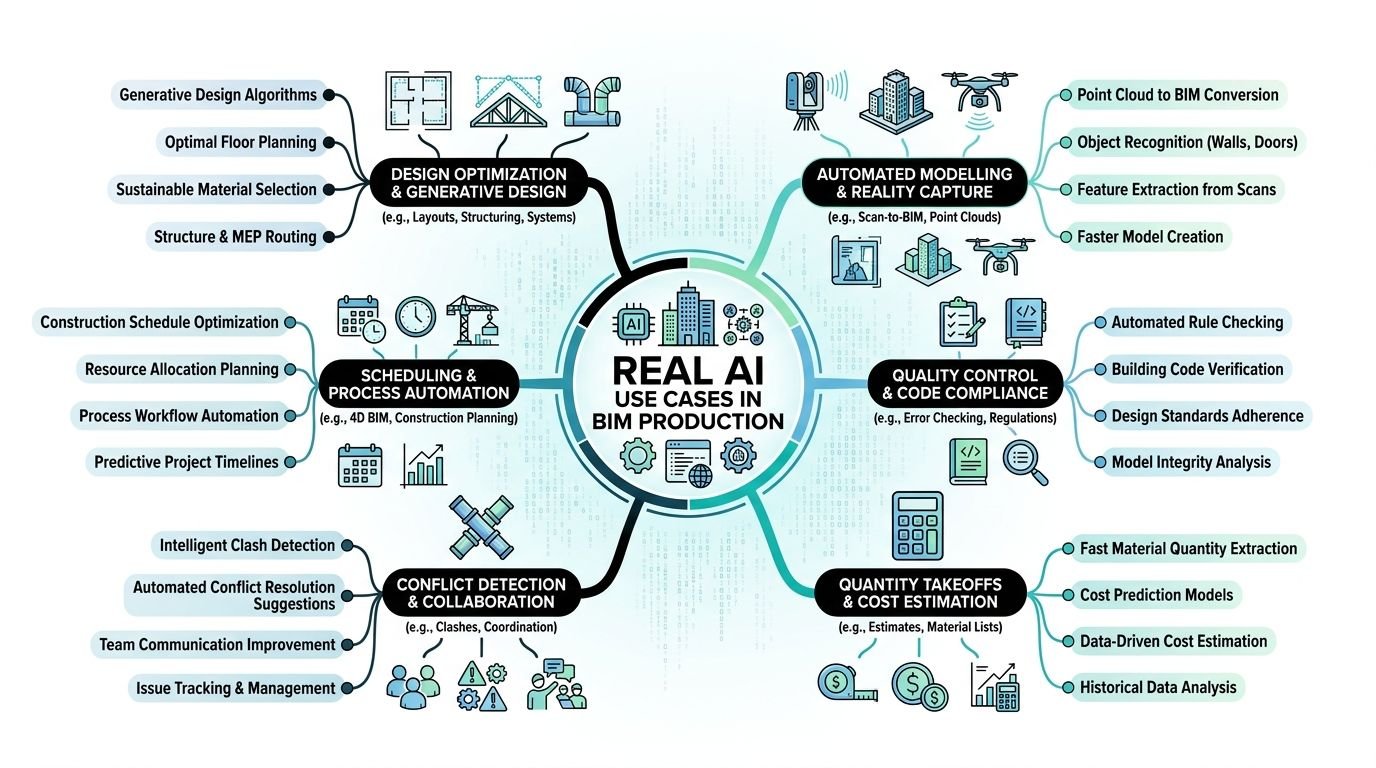
The strongest use cases share one trait. They sit inside repeatable workflows with recognizable patterns, structured inputs, and a clear review path. That’s where AI architectural production starts to feel practical.
Clash detection and issue triage
This is one of the clearest current applications.
AI-assisted clash workflows analyze models and related project data to identify conflicts, omissions, and compliance issues before construction. According to IMAGINiT, engineers spend nearly 30% of their time on streamlinable tasks, and 74% of AEC firms use AI to deliver faster and win work via reduced delays and budget overruns. The same source notes that early AI clash flagging can save 10% to 20% of rework costs in major US markets when used with human review in the loop (IMAGINiT on what AI can do for AEC firms today).
That doesn’t mean AI replaces Navisworks coordination or an experienced BIM coordinator. It means it can help teams sort signal from noise faster.
Useful outputs include:
- Severity ranking so teams don’t treat every clash as equally urgent
- Pattern spotting across recurring problem types, such as repeated ceiling congestion or shaft conflicts
- Issue reporting that speeds the first pass before a coordinator reviews the list
This is especially useful in projects where issue volume becomes the problem. The value isn’t just finding clashes. It’s reducing the time spent manually filtering obvious ones from important ones.
Generative design and layout support
This use case is real, but it’s often oversold.
Tools in this category generate layout options based on defined constraints such as adjacency, circulation, daylight, or spatial efficiency. In early planning, that can be helpful. Teams can compare multiple options faster than they could by hand.
The catch is where this output stops being useful.
In concept or test-fit work, AI can support iteration. In documentation, the value drops fast. The tool may produce plausible arrangements, but it won’t understand why one room needs a nonstandard clearance because of a client standard, a local reviewer preference, or a discipline coordination issue that came out of a previous submittal.
Field lesson: Generative output is strongest when the question is spatial. It weakens when the question becomes contractual, code-specific, or office-standard specific.
So yes, AI Revit tools and adjacent planning tools can help teams explore options. No, they don’t replace the production logic needed to carry those options into sheets, schedules, details, and coordinated documents.
Drawing sheet automation
This is less glamorous than generative design and often more useful.
A lot of BIM production hours disappear into repetitive sheet tasks. View placement. Sheet population. annotation routines. Repetitive tagging patterns. Matching office setup standards across a set. AI and adjacent automation features can help reduce manual handling in these areas.
The practical benefit is consistency.
For teams managing large documentation packages, drawing automation can reduce the drag created by repetitive sheet assembly. That doesn’t remove QA. It reduces the amount of low-value clicking required before QA can happen.
Good candidates include:
- View-to-sheet suggestions based on naming and type
- annotation assistance where tags and notes follow repeatable patterns
- sheet population support for standard package structures
BIM automation often matters more than branding in this context. Whether a vendor calls it AI or not, the question is whether it shortens production without breaking your standards.
Data extraction for schedules and specifications
Another practical use case sits in model data.
AI-assisted workflows can pull parameters from BIM models to help populate schedules, specification inputs, submittal information, or QA checks. If the model is well-structured, this can reduce manual re-entry and lower the chance of copying outdated information from one document to another.
This matters in production because manual transfer work creates quiet risk. A wrong value can move from model to schedule to sheet note and stay invisible until a review meeting, submittal return, or site question exposes it.
The strongest applications involve:
- schedule population from validated parameters
- spec support where product or system data can be organized before human review
- submittal preparation based on model-linked information
This is one of the more practical forms of artificial intelligence construction documents support. Not because the output is magic, but because it reduces the amount of manual transcription that teams normally absorb as “just part of production.”
Where AI Falls Short in BIM Workflows
The short version is simple. AI handles patterns better than context. BIM production depends on both.
That’s why the weak points show up quickly on live work, especially when a project has legacy CAD inputs, inconsistent family standards, consultant gaps, or code interpretation issues that sit between disciplines.
Judgment still sits with the team
AI can optimize against rules you define. It can’t reliably understand why a project team made a specific exception six weeks ago after a client workshop, a reviewer comment, or a coordination compromise.
Production teams make these calls all the time:
- keep a nonideal layout because it protects a downstream permit issue
- preserve a family behavior because several linked views depend on it
- draw a detail one way because the AHJ has rejected the cleaner version before
- accept one clash because resolving it creates a bigger documentation problem elsewhere
These are not failures of technology. They are context-heavy decisions.
A tool can suggest. It can flag. It can rank likely issues. But it doesn’t carry project memory the way a good project architect, BIM lead, or discipline coordinator does.
Bad data breaks good automation
Most failures blamed on AI are really failures in model readiness.
The AEC Foundry notes that effective AI workflows in AEC require domain-specific pipelines that convert BIM models, CAD files, PDFs, point clouds, spreadsheets, images, and videos into machine-readable formats. Generic natural language processing doesn’t handle that environment well. The same piece explains that 70% to 80% of AEC information is unstructured, which is why preprocessing, structured exports such as SQL or JSON, OCR, metadata tagging, and standards like IFC or COBie matter before agentic workflows can perform reliably (AEC Foundry on making AEC data work for AI).
That matches what teams see in practice.
If families are inconsistent, parameters are missing, view naming is loose, and linked models don’t follow a predictable standard, AI doesn’t rescue the workflow. It inherits the mess.
A few common failure points:
| Workflow condition | What happens |
|---|---|
| Inconsistent parameter naming | Schedule and data extraction outputs become unreliable |
| Poor family structure | Automation misclassifies or skips elements |
| Unstandardized CAD imports | Downstream model interpretation gets noisy |
| Weak metadata on files | Search and retrieval tools return thin or irrelevant results |
This is why firms often overestimate how quickly they can deploy AI in AEC. They evaluate the tool before evaluating their own data hygiene.
Verification eats into the headline savings
AI output always needs review in production. That’s not a temporary limitation. It’s part of the operating model.
An automated clash list still includes false positives. A generated layout still needs to be checked against intent. A pulled spec value still needs someone to confirm it belongs in the current package. A note-writing assistant can still produce language that sounds correct and conflicts with the drawing set.
AI doesn’t remove QA. It often moves QA later in the chain and changes what has to be checked.
That creates a hidden cost. Teams may save time on first-pass generation and then give some of it back during verification. Sometimes that trade still makes sense. Sometimes it doesn’t. The only honest measure is net time and net risk, not generation speed by itself.
Integration is usually the hard part
The demo rarely includes your template, your view naming logic, your permit checklist, your shared parameters, or your consultant coordination habits.
That’s where implementation slows down.
Most firms already have working systems, even if those systems are imperfect. AI tools have to fit into Revit templates, documentation standards, folder structures, QA routines, and issue tracking practices. If they don’t, the team creates a parallel process. Parallel processes create drift.
The best tool in the wrong workflow becomes one more thing staff has to remember under deadline.
How AI Affects BIM Team Structure
The most realistic effect of AI on production teams isn’t elimination. It’s redistribution.
Repetitive work doesn’t disappear. Some of it gets faster. Some of it changes shape. Some of it moves from manual production into setup, validation, and exception handling. That matters for org charts, training, and role definitions.
Junior roles move closer to verification and model control
When AI or smart automation handles parts of clash scanning, sheet setup, or data extraction, junior staff often spend less time on raw repetition and more time checking outputs, cleaning models, and preparing data for reliable handoff.
That can be a good shift.
A junior team member who learns how to validate outputs, manage model health, and recognize bad automation results is building stronger production judgment than someone who only repeats low-skill drafting tasks. But it requires guidance. Verification is not an entry-level task if nobody explains what “wrong” looks like.
The workforce angle matters here. The ASCE coverage of a Bluebeam survey notes that AEC has been slow to adopt AI because of complexity, culture, and poor integration across teams and workflows. It also highlights early assistance-based use cases, including a custom LLM at Bechtel that helped younger professionals query manuals in minutes instead of days, showing how AI can support knowledge transfer as experienced staff retire (ASCE on the AEC sector’s slow adaptation to AI).
That’s a more useful framing than replacement talk. For many firms, a significant opportunity is better onboarding, stronger access to internal standards, and less dependence on one senior person remembering where everything lives.
Senior staff spend more time where judgment matters
If AI handles first-pass issue sorting or repetitive documentation setup, senior staff can move away from avoidable bottlenecks.
That only happens if the workflow changes with the tool.
A principal or project architect should not still be manually checking things a rule-based or AI-assisted process can surface earlier. Their time is better spent on design decisions, consultant alignment, client-facing review, and final QA checkpoints that require actual judgment.
For firms exploring AI in BIM, implementation often succeeds or stalls at this stage. A tool may work, but the review ladder stays unchanged. Junior staff still wait for direction. Senior staff still review too late. The office keeps the old process and adds a new tool beside it.
New checkpoints matter more than new software
The useful change is often procedural.
A practical team structure might look like this:
- Overnight runs handle model scans, issue clustering, or documentation suggestions
- Morning coordinator review clears false positives and routes real issues
- Production teams update models or sheets with clear task ownership
- Senior review happens at decision points, not at every repetitive step
Firms get better results from AI when they redesign checkpoints, not when they simply add licenses.
That’s the operational side of AI in AEC most leadership teams underestimate. Tools don’t create efficiency on their own. Review structure does.
Outsourcing BIM Work in the AI Era
AI changes the outsourcing conversation, but it doesn’t end it.
External production support still makes sense when the workload is high-volume, deadline-driven, and too large for the in-house team to absorb without disrupting core design or coordination work. AI may reduce some manual effort inside those workflows, but it doesn’t remove the need for disciplined production capacity.
The split just becomes more deliberate.
What stays in-house
Tasks that depend heavily on project context, client sensitivity, office standards interpretation, or cross-discipline judgment usually belong close to the core team.
That often includes:
- design decisions and option selection
- final QA and permit readiness checks
- consultant issue resolution
- custom standards decisions inside templates or family strategy
What still fits outsourced production
Bulk model development, drawing setup, repetitive documentation work, annotation execution, and structured model build-out remain strong candidates for external production pods, especially when the handoff rules are clear.
AI can support these workflows, but it rarely eliminates the labor behind them. A sheet still needs to be coherent. A model still needs to be built to standard. A family still needs to behave correctly in the actual project environment.
The practical question isn’t whether AI replaces outsourced support. It’s this:
Which tasks can in-house teams accelerate with AI, and which tasks still require dedicated production bandwidth?
A sensible split often looks like internal teams owning standards, checkpoints, and exception handling, while external teams execute repeatable production work under those rules.
The handoff has to be explicit
Firms often get into trouble in this situation.
If the in-house team runs AI-based clash screening and the external team assumes issue triage is included in their scope, overlap starts. If an outside team builds sheets from a template while the internal team is also testing annotation automation, inconsistency shows up quickly.
Good handoffs define:
- which outputs are AI-assisted
- who verifies them
- what standard governs corrections
- when files return for final QA
That clarity matters more now, not less.
How to Evaluate AI Tools for BIM
Most firms don’t need another AI presentation. They need a test method.
That method should tell you whether a tool survives real model conditions, whether the net productivity gain is positive after review, and whether the software fits your delivery system without forcing a parallel workflow.
BST Global reports that 77% of global AEC technology leaders believe AI will transform business models, yet only 20% report mature or advanced readiness. The same report also notes practical adoption in adjacent business functions, while the Vectorworks findings cited there show 50% of over 500 professionals already see moderate to extreme AI presence in workflows and 86% expect broad use within a decade (BST Global AI + Data Insights Report).
That gap between belief and readiness is exactly why evaluation discipline matters.
Start with a live project model
Don’t start with the vendor’s clean sample file.
Use a current or recently completed model that includes the kinds of problems your office deals with. Mixed standards. imported backgrounds. parameter gaps. linked discipline issues. legacy families. messy views. If the tool only performs well on ideal conditions, it hasn’t passed the test.
A useful pilot model should include enough production complexity to expose failure modes. That’s where true value shows up.
Measure net time, not generation time
This is the mistake that makes many pilots look better than they are.
If a tool creates a clash report in minutes but a coordinator then spends a long review cycle removing noise, the comparison has to include that review time. If a drawing assistant populates sheets quickly but someone spends additional effort correcting naming, tagging, or layout logic, that correction time counts too.
Track three things separately:
- Generation time
- Verification time
- Rework created by tool errors
That gives you a realistic picture of whether the workflow improved.
Practical rule: If your pilot doesn’t measure verification effort, it isn’t measuring production impact.
Watch how the tool fails
Capability matters. Failure behavior matters more.
A strong evaluation asks questions like:
- When the tool is wrong, is it obviously wrong or subtly wrong?
- Does it fail safely, or does it produce plausible output that slips past review?
- Can the team trace why it made a recommendation?
- Can staff override it cleanly without breaking downstream work?
In BIM production, subtle errors are worse than visible ones. A visible miss gets corrected. A plausible miss gets issued.
Test integration before you assume scale
A lot of tools can do one useful thing in isolation. Fewer fit into established project delivery systems.
Check whether the tool works with:
- office templates
- naming conventions
- shared parameters
- issue tracking methods
- documentation review checklists
- consultant coordination routines
If it requires the team to step outside normal production behavior every time they use it, adoption will be weak and results will drift.
AI Tool Evaluation Checklist
| Criterion | What to Test | Red Flags |
|---|---|---|
| Model readiness | Run the tool on a live project model with imperfect data | It only performs well on sample files or highly cleaned models |
| Output quality | Compare generated results against a manual baseline | Plausible errors that are hard to catch in review |
| Verification burden | Record review time required after tool output | Claimed speed gains disappear once checking is included |
| Workflow fit | Test inside your template, standards, and naming system | Requires a side workflow or manual remapping each time |
| Error handling | Deliberately push edge cases and exceptions | No clear override path or weak explanation of failures |
| Integration | Check compatibility with Revit, file structures, and handoff processes | Results can’t move cleanly into production without extra steps |
| Support and maturity | Ask what works now, not what’s on the roadmap | Heavy dependence on “coming soon” features |
A tool doesn’t need to be perfect to be useful. It needs to be reliable enough, transparent enough, and bounded enough that the team can trust where it fits.
What’s Next for AI in AEC
The near-term direction is less dramatic than the marketing and more useful than the skepticism.
AI is becoming part of normal AEC operations, but the firms getting value from it are usually not chasing autonomous design fantasies. They’re selecting narrow workflows, building repeatable checks around them, and improving data discipline so the tools have something solid to work with.
The broader adoption trend is real. The Vectorworks Report 2025 says 50% of over 500 surveyed AEC professionals report AI as moderately to extremely present in their workflows, while 86% expect widespread adoption within the next decade. The same source says 68% use BIM and 38% of non-adopters plan BIM integration in the next five years. It also notes that 53% of A&E firms use AI in business development, proposal writing, and project analytics, with median proposal win rates at 50%, and places this in a market projected to reach $16.3 trillion globally in 2025, including around $3 trillion in North America (Vectorworks Report 2025 summary from Nemetschek).
What matters for BIM production is more specific than that market picture.
The most believable gains are operational
The next stretch of progress will likely show up in areas teams can already define clearly:
- model QA and standards checking
- drawing assistance tied to repeatable sheet logic
- issue prioritization in coordination
- data extraction for schedules, submittals, and internal checks
- knowledge retrieval from firm standards and past project information
Those are grounded use cases. They support predictability. They help with consistency. They reduce manual handling in places where teams already know what “correct” looks like.
Firms should resist end-state thinking
A lot of wasted effort comes from buying into the final vision instead of solving the current bottleneck.
If a team can improve sheet setup, model QA, or clash triage now, that’s more valuable than waiting for a future tool that claims to draft a full coordinated package with minimal oversight. Production leaders need shipped capability, not a roadmap.
The firms that benefit most from the future of BIM will probably be the ones that keep the scope tight, train staff on review responsibility, and improve standards so automation has a stable environment to operate in.
Selective adoption beats broad experimentation when deadlines, QA, and liability are on the line.
The next year or two will favor disciplined teams
That’s the honest view.
Not every office needs an AI strategy deck. Most need cleaner templates, more reliable parameters, better naming discipline, and a shortlist of production problems worth testing against. AI becomes more valuable when those basics are in place.
The firms that treat AI as part of production systems, rather than a substitute for them, are likely to make better decisions.
Conclusion and Next Steps
Back to the principal’s question.
What AI tools should we be using right now?
The balanced answer is this. Use AI where the task is repetitive, pattern-based, and reviewable. Be careful anywhere the work depends on project history, client preferences, consultant nuance, permitting interpretation, or office-specific standards judgment.
In BIM production today, AI can help with clash screening, issue prioritization, sheet setup support, and data extraction from well-structured models. It can reduce manual effort in those areas. It can also create false confidence if teams skip verification, test only on polished demo data, or assume a tool will somehow overcome bad model structure and weak standards.
That’s why the essential conversation isn’t only about software.
It’s about workflow design, QA structure, decision checkpoints, model readiness, and role clarity. Junior staff may spend more time validating and managing outputs. Senior staff can spend more time on judgment-heavy review if the process is reorganized around that shift. Outsourced production still has a place, but the handoffs need to be sharper and more explicit in an AI-assisted workflow.
The firms making good decisions with AI in AEC aren’t the loudest ones. They’re the ones testing on real projects, measuring net gains after verification, and rejecting tools that only work in ideal conditions.
That’s the practical middle. Not hype. Not dismissal. Just disciplined adoption tied to production reality.
If you’re sorting through tools internally, build a short pilot checklist before you buy anything. Test one real workflow. Track generation time, review time, and failure modes. That alone will tell you more than most demos will.
If you want a clearer way to assess where AI fits in production, BIM Heroes shares practical frameworks for BIM workflow planning, delivery structure, and production decision-making. A simple checklist that maps tasks, review ownership, and handoff points is often the best place to start.