


Mechanical schedules fail in two predictable ways. The first is the bloated version built in Revit with thirty columns, half of them copied from family metadata that nobody on site will use. The contractor has to hunt for the few fields needed to price, order, and rough in the unit. The second is the stripped-down version with four neat columns that looks clean on a sheet but gives the plan reviewer no way to verify capacity, efficiency, or code compliance.
That's where most RFIs start. Not with bad intentions. With a schedule that doesn't know who it's serving.
A solid mechanical equipment schedule Revit MEP workflow has to do two jobs at once. It has to support permit review, and it has to support procurement and coordination. If you don't separate those purposes in the way you structure the schedule, the sheet becomes noise. If you do, it becomes one of the most useful control documents in the set.
Introduction
A schedule can be technically complete and still be useless.
You've probably seen it. The Revit MEP equipment schedule looks polished, every row is filled, and the sheet passes an internal glance test. Then the contractor asks where the actual ordering information is, or the reviewer kicks back comments because they can't verify that the scheduled unit matches the design intent. Both problems come from the same source. The schedule was assembled as a data dump, not as a controlled document.
That's the core issue in equipment scheduling. It isn't just about getting data into Revit. It's about deciding what belongs in the permit set, what belongs in procurement, and how to arrange the fields so the sheet reads in the order people typically use it. If you want a schedule that passes plan check and doesn't generate avoidable RFIs, column discipline matters as much as parameter completeness.
What a Mechanical Equipment Schedule Is Actually For
A mechanical schedule gets read in two very different moments of the job. First, it lands on a plan reviewer's desk during permit review. Later, that same schedule gets used by the contractor, TAB team, suppliers, and field coordination staff who need to turn the design into purchased and installed equipment. If you do not account for both uses, the sheet becomes hard to trust.
For permit review, the schedule has one job. It needs to show that the equipment shown on the drawings matches the design basis and satisfies code-related requirements. The reviewer is looking for enough technical information to confirm the unit selection makes sense. They are not trying to decode office shorthand, internal comments, or every manufacturer-specific option your team discussed during design.
For procurement and coordination, the priorities shift. The contractor needs to confirm what gets bought, what utilities are required, how much space the unit needs, whether the structure can support it, and what other trades need to know before installation. That reader is trying to avoid delay, substitution confusion, and field clashes.
On fast-track commercial projects, design teams often respond by pushing every known parameter into one schedule and hoping each reader will sort it out. That usually creates the opposite result. Review items get buried under coordination notes. Procurement fields sit next to family data that means nothing outside the model. Then the comments start. Plan check asks for clearer performance data, and the contractor asks for a separate equipment list because the scheduled sheet is too messy to use.
The fix is straightforward. Build the schedule in the order each audience reads it.
Start with identity and design intent. Follow with compliance and performance data. After that, place coordination fields that help the contractor install the unit correctly. Procurement details can come later, or in some cases belong in a separate issue-specific schedule rather than the permit sheet.
Column order controls how the schedule gets used
Junior staff often treat column arrangement as a formatting decision. It is a review and coordination decision.
A good schedule lets the reader verify the unit before they hunt for secondary details. Tag, equipment description, service, location, major capacities, airflow, and efficiency data should appear early because those fields answer the first questions a reviewer asks. Once that is clear, connection data, electrical characteristics, operating weight, mounting, and access notes can support coordination without interrupting the logic of the row.
Put those columns in the wrong order and the sheet slows everyone down. If the first thing a reviewer sees is manufacturer, remarks, keynote, and a long model string, they still do not know whether the unit serves the right space or meets the design intent. If the first thing a contractor sees is a block of code data with no utility or support information nearby, they still have to go hunting through plans, details, and submittal notes to price and coordinate the work.
That is the purpose of the schedule. It is the point where one document has to satisfy permit review and still remain useful for buying and installing equipment. The way you structure the columns decides whether it does both cleanly or creates confusion for both sides.
What Must Be in the Schedule for Permit and Procurement
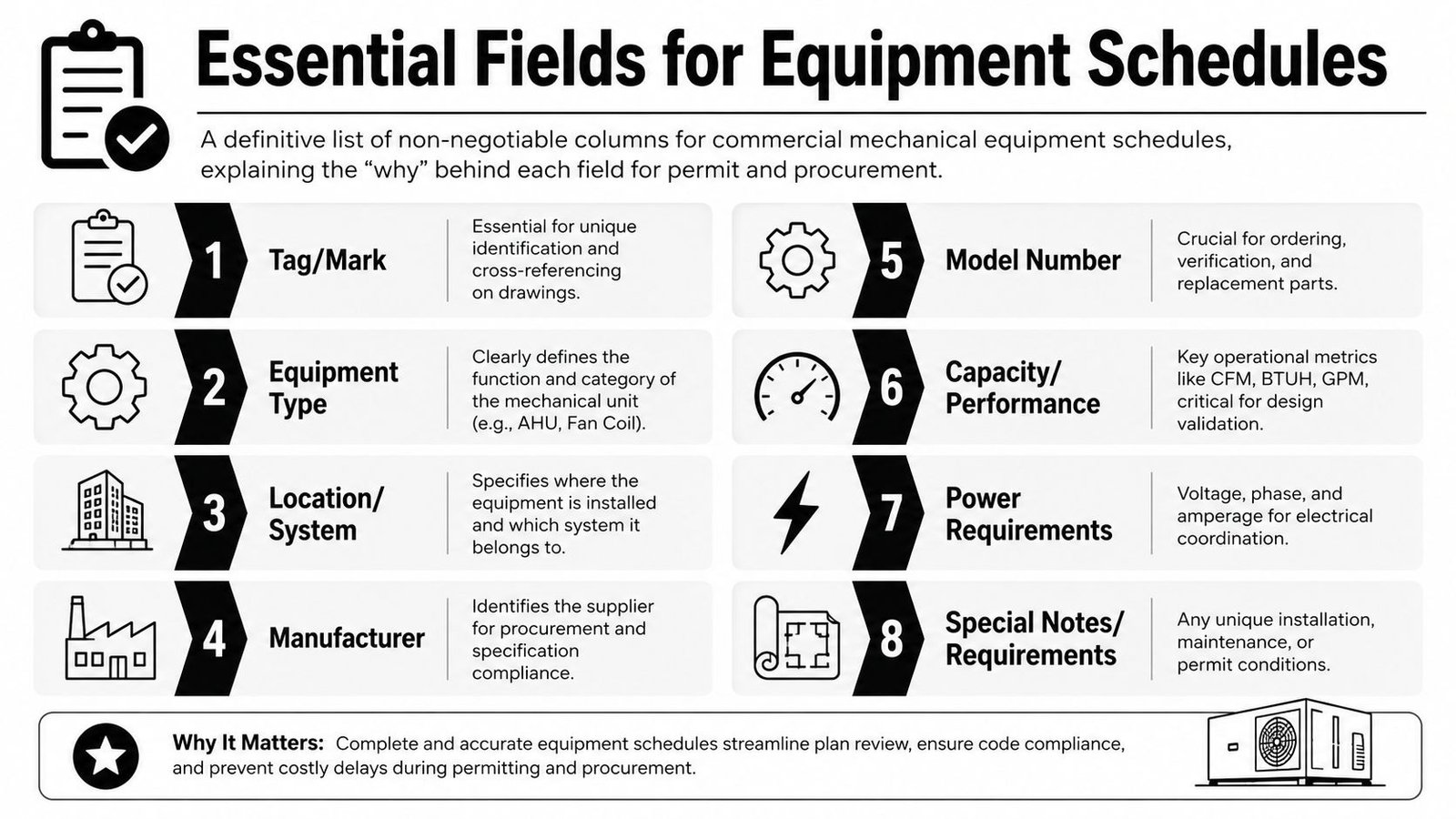
If you're building a Revit MEP equipment schedule for a commercial permit set, some fields are mandatory. Leave them out and you're almost asking for corrections.
Core identifiers
Start with the fields that tie the row to the drawing set.
- Equipment tag. Every row needs a unique identifier that matches the symbol or annotation on plan.
- Equipment type and service. Don't make the reader decode abbreviations in isolation. “RTU-2 serving Corridor and Lobby” is better than a bare family name.
- Location. Floor, zone, room, roof area, or other placement reference. A good location field reduces coordination calls immediately.
If there's a piece of equipment on the plans and no matching row in the schedule, the set is incomplete. If there's a row in the schedule for a unit that isn't shown anywhere, the set is also incomplete.
Performance and compliance fields
At this point, the permit reviewer spends time.
| Field | Why it matters |
|---|---|
| Cooling capacity | Verifies the scheduled unit aligns with design intent |
| Heating capacity | Needed where equipment provides heat |
| Airflow | Supports performance review and duct coordination |
| Efficiency rating | Supports energy code review |
| Refrigerant type | Common permit requirement for refrigerant-bearing units |
Cooling may be shown in tons or MBH. Heating may be shown in MBH or kW. Airflow should be shown in CFM. The point isn't the exact label style. The point is consistency across every row.
If your team is also validating scheduled equipment against HVAC load calculations, the schedule needs enough performance data to make that cross-check direct. Reviewers shouldn't have to triangulate between multiple sheets just to confirm the basic selection.
Keep the schedule readable from left to right. Identification first. Performance second. Support data after that.
Electrical and utility data
The sheet becomes useful beyond permit.
- Voltage
- Phase
- Amperage
- Minimum circuit ampacity
- Maximum overcurrent protection
Without those fields, electrical coordination is incomplete. The mechanical sheet may still look acceptable internally, but the conflict will show up when the electrical drawings are checked or when the subcontractor starts laying out feeders and disconnects.
Operational guidance in adjacent industries keeps coming back to the same principle. Teams work better when information is consolidated and standardized rather than scattered across fragmented records. That matters in BIM too, where schedule reliability depends on metadata discipline and cross-team visibility, as noted in 24×7 Magazine's discussion of standardized maintenance information practices.
Information That Belongs in the Schedule But Is Frequently Missing
A schedule can include the obvious fields and still fail in the field. The most painful misses are usually the items nobody thinks about until coordination breaks.
External static pressure and outside air
For air handlers and similar units, external static pressure belongs in the schedule. If it isn't shown, nobody can quickly verify whether the selected unit can overcome the duct system resistance. That gap usually turns into a late design question or a submittal comment that should have been prevented earlier.
Minimum outside air CFM is another common omission. Ventilation review often gets slowed down because the schedule doesn't state the outdoor air basis clearly enough. When that field is missing, reviewers and coordinators have to bounce between schedules, plans, and calculation packages to reconstruct the intent.
Acoustic and structural data
The next group of misses tends to show up during coordination meetings.
- Sound rating. Use NC or sone data where equipment is in or near occupied spaces.
- Operating weight. This is critical for rooftop units, larger air handlers, and any equipment affecting support design.
- Structural loading note. Not a substitute for structural design, but a clear handoff prompt.
A lot of mechanical teams leave weight out because it feels like a structural issue. It isn't. It's a coordination issue first.
If the mechanical schedule doesn't carry operating weight, the structural engineer is working with assumptions. Assumptions are where field conflicts come from.
Why template discipline matters here
These fields are often missing because they aren't built into every family. That's not a drafting problem. It's a content management problem.
If your office libraries aren't standardized, one family will have sound data, another will hide it in a text note, and a third won't include the parameter at all. That's why schedule quality depends heavily on family discipline. Teams cleaning up Revit family content usually see the scheduling problems surface immediately because blank cells expose bad content standards faster than almost anything else on the sheet side.
What Should Not Be in the Permit Schedule
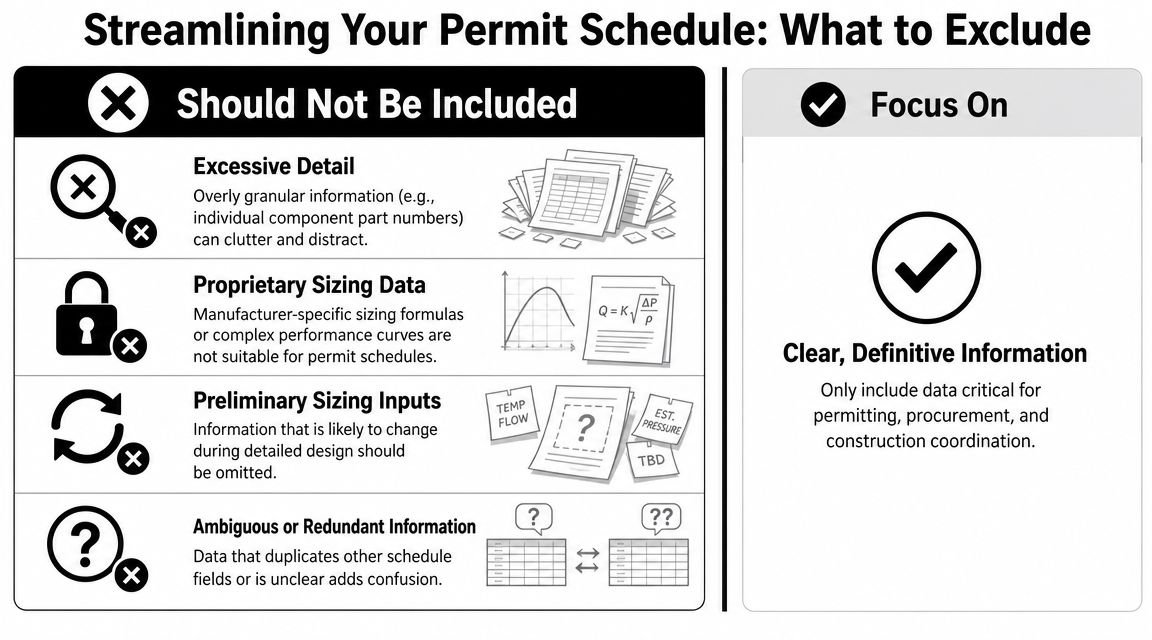
A crowded permit schedule wastes time and creates risk. The fix is not to make it thinner for appearance. The fix is to remove data that doesn't belong in that document stage.
Manufacturer-specific model numbers too early
At permit stage, locking a schedule to a specific manufacturer model number often causes more problems than it solves. Equipment availability changes. Product lines change. Alternates come through submittals. If the permit schedule hard-codes a model too early, the team has to either revise the documents unnecessarily or explain why an approved alternate doesn't match the issued sheet.
A cleaner approach is to schedule performance requirements for permit and manage exact model selection through specs and submittals.
Notes that belong somewhere else
Permit schedules often get bloated with note content that should sit in specification sections or general notes.
Don't use schedule columns for things like:
- Installation instructions that repeat “install per manufacturer recommendations”
- General quality notes that apply to every unit anyway
- Internal review remarks copied from design development coordination
Those fields don't clarify the equipment. They bury it.
Internal operations data
This one causes version-control trouble fast.
| Leave out of the permit schedule | Keep in separate project controls |
|---|---|
| Purchase order status | Procurement log |
| Lead time tracker | Equipment buyout tracker |
| Vendor quote status | Estimating or PM log |
| Internal approval notes | Design QA checklist |
When project tracking data appears on contract sheets, teams start using one document for two purposes. That almost never holds up through revisions.
The permit schedule should stay stable, readable, and purpose-built. If your PM needs a buyout tracker, give them one. Don't turn the HVAC equipment schedule construction documents sheet into a procurement dashboard.
Setting Up the Mechanical Equipment Schedule in Revit MEP
A clean schedule starts long before you place it on a sheet. Most scheduling problems in Revit come from bad category control, inconsistent parameters, or families built by different people with different naming habits.
Start with category and parameter control
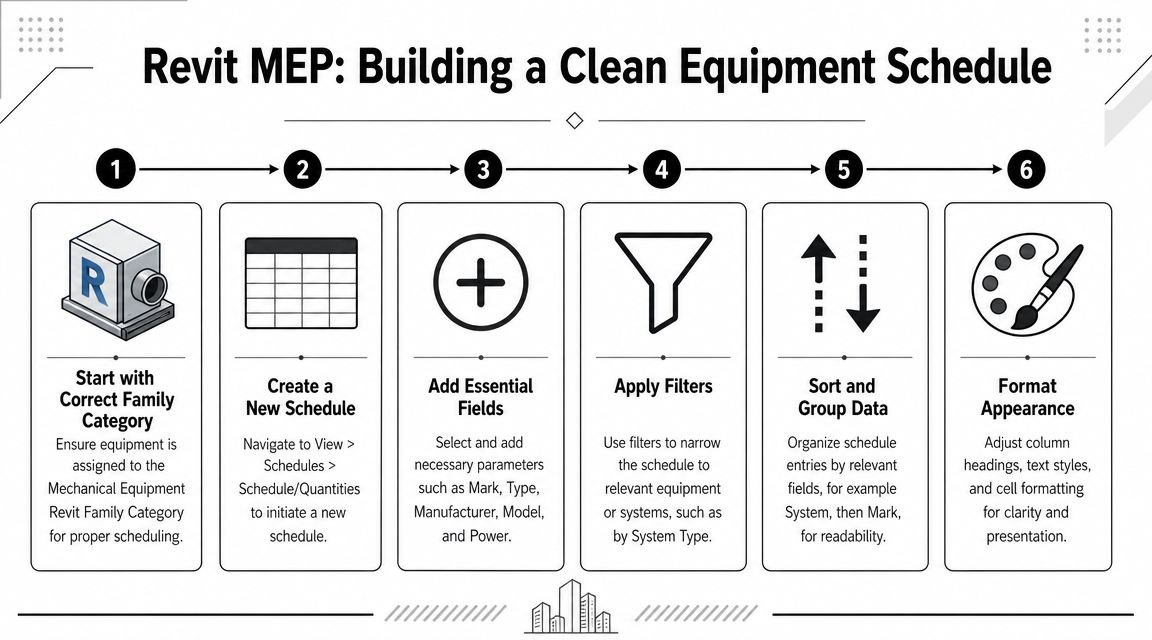
Mechanical schedules only work if the content is in the right place.
- Use the Mechanical Equipment category for every schedulable piece of mechanical equipment.
- Audit imported or legacy content before the project gets deep. A family in the wrong category won't magically appear when the deadline gets close.
- Build shared parameters early for fields Revit doesn't handle out of the box, including external static pressure, OA CFM, sound rating, and any office-standard notes.
Revit mechanical schedule parameters need office-level rules, not project-by-project improvisation.
Naming consistency is not optional
Blank schedule cells usually trace back to parameter inconsistency. One family uses “ESP.” Another uses “Ext Static.” A third stores the value in a type comment. Revit isn't the problem there. The content standard is.
Clean metadata is the foundation of a reliable schedule. If families don't use the same parameter names, the schedule can't act like a controlled document.
That lines up with a broader scheduling principle. PMI notes that without a proper work breakdown structure, a schedule becomes unorganized, and it recommends breaking work down, defining resources, estimating durations, then validating the logic with schedule analysis in PMI's guide to schedule best practices. In a BIM context, the equivalent is straightforward. If your content and metadata aren't structured correctly, the schedule output won't be trustworthy.
For teams standardizing this inside Revit MEP production workflows, the best move is to build these parameters into the template and family library from day one.
Build the schedule to read well on paper
Once the data is right, the view still needs discipline.
A practical sort and group structure usually looks like this:
- Group by equipment class such as AHUs, RTUs, EFs, FCUs, and unit heaters.
- Sort by tag number within each class.
- Hide fields that are only for filtering if they don't need to print.
- Use consistent heading language across all schedules in the set.
The goal isn't just accurate extraction. It's a schedule that a reviewer or coordinator can scan in seconds.
A good MEP schedule permit drawings setup isn't one giant alphabetical list of everything in the model. It's organized by how people coordinate the work.
Coordinating the Schedule with Other Disciplines
The schedule is often where coordination failures first become visible. A unit heater shows as 208V single phase on the mechanical sheet, but electrical carried it as 480V three phase. The permit set may still get through, but the contractor will catch it, send an RFI, and now the team is explaining which sheet is right.
That is why I do not treat the mechanical equipment schedule as a mechanical-only document. It is a coordination document with two audiences. The reviewer wants a clear, code-facing record of what was designed. The contractor and other trades need enough stable information to price, route, support, and connect the equipment. If the column order and content are sloppy, each group reads the same row differently and coordination starts to drift.
Electrical coordination
Electrical usually reads the schedule from the power columns first. Put voltage, phase, MCA, and MOCP in a predictable location and keep the terminology identical to the electrical sheets. If mechanical says "MOP" and electrical says "MOCP," someone will ask whether the values were checked or copied from different cutsheets.
Match the schedule to the one-line intent, panel schedules, and equipment connection notes before issue. Do not leave placeholder values in the model just because the basis-of-design unit is still changing. Placeholder power data has a way of making it onto the sheet, and once it is printed, other disciplines start designing around it.
Structural and plumbing handoffs
Structural is not looking for every performance metric. Structural needs the numbers that affect support design and loading. That usually means operating weight, curb or housekeeping pad requirements, suspended versus floor-mounted condition, and any note that changes how the unit is supported.
Plumbing has a different read of the same schedule row. They need to know which equipment needs a drain, gas, domestic water, relief, or hydronic connection. If that information is buried in remarks or split between plan notes and schedules, expect missed connections and coordination comments.
Schedule structure matters. Keep permit-review information clear and near the front of the row. Put cross-trade connection data where coordinators can find it fast, usually after the core identification and capacity fields. That arrangement serves both audiences without turning the permit schedule into a procurement spreadsheet.
Before every issue, run a short cross-discipline audit:
- Electrical match check against panel schedules, one-lines, and connection notes
- Weight and support check for rooftop units, hung equipment, and large floor-mounted equipment
- Piping and drain review against plumbing plans, risers, and details
- Tag consistency check across plans, schedules, and keynote references
A schedule can be correct by itself and still be wrong for the set. The sheet only works when the other disciplines can use it without making assumptions.
Common Plan Check Corrections on Mechanical Schedules
Most plan check comments on schedules are repetitive. That's good news, because repetitive comments can be caught with a repeatable QA pass.
The usual misses
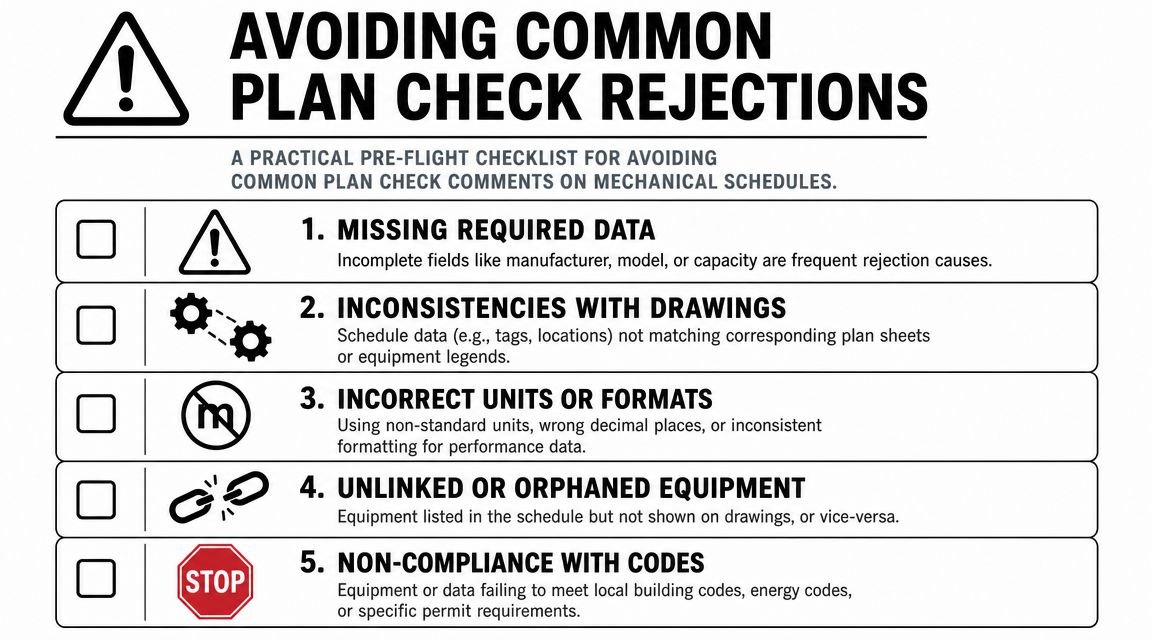
Run this checklist before every issue:
- Efficiency ratings missing. Add EER, SEER, COP, AFUE, or the applicable metric for each equipment type.
- Electrical fields incomplete. Check voltage, phase, MCA, and MOCP on every row where required.
- Refrigerant not listed. Add refrigerant designation for each refrigerant-bearing unit.
- Minimum outside air CFM omitted. Verify against ventilation intent.
- Tagged equipment missing from the schedule. Compare plans to schedule row by row.
Revit-generated errors that look like design errors
Some comments aren't code misses. They're model management misses.
| QA check | Failure it prevents |
|---|---|
| Shared parameter audit | Blank cells for some family types |
| Unit consistency review | Mixed capacity units across schedule |
| Category audit | Equipment missing from schedule entirely |
| Sheet-to-model tag check | Orphaned plan tags or unscheduled equipment |
A lot of these problems don't show up because the design is weak. They show up because the schedule was built late, after content inconsistencies were already embedded.
One more practical rule helps here. Review schedules in the same way strong operations teams review active schedules. In manufacturing scheduling, teams are advised to review plans daily or weekly and adjust using actual conditions, while KPI feedback such as scheduling adherence and machine utilization reveals when the schedule is drifting, as described in JITbase's scheduling best practices. In MEP production, the equivalent is simple. Don't wait until sheet issue to see whether the schedule still reflects the model accurately.
From Schedule to System Final Thoughts
A mechanical equipment schedule has to do two jobs without creating two versions of the truth. One schedule has to satisfy permit review. The other has to help the contractor buy, coordinate, and install the work. If you mix those audiences carelessly, the result is predictable. Review comments on one side, RFIs on the other.
The fix is usually not more data. It is better structure.
Put the permit-facing information first, in a clean order that reads like a code and design compliance check. Keep the procurement and coordination fields organized after that, or in a clearly identified companion schedule if the project demands it. That column order matters more than many teams realize. It controls how quickly a reviewer can verify the design intent and how easily a contractor can find the information needed for submittals, curbs, power, access, and connections.
Good schedule work also exposes whether the model is being managed with discipline. If tags, families, parameters, and sheet content are not aligned, the schedule will show it immediately. That is why experienced teams build the schedule early and keep checking it during production, not just before issue.
Done right, the schedule stops being a sheet requirement and starts acting like a control point for the whole mechanical set. It reduces avoidable resubmittals, keeps coordination cleaner, and gives the field a document they can use.
If your team needs hands-on support with permit-ready schedules, Revit MEP production, and coordinated documentation, explore BIM Heroes' MEP production services.