A permit set can look clean right up until plan check opens the window schedule, compares it to the energy compliance form, and finds a mismatch. The sizes are there. The types are there. The frame material is there. But the U-factor and SHGC fields are blank, or worse, they don't match the numbers carried on the compliance form. That's how a routine submittal turns into a correction cycle that burns time, pushes fabrication decisions, and forces the team to reconcile a schedule that should have been locked earlier.
Door and window schedules stop being a convenience list and start acting like a compliance record. If you need a broader framing of the permit-set side of this, the companion post on Energy Code Compliance: Essential Documentation 2026 is the right place to start. Here, the focus is narrower and more practical, what the schedule has to show so it survives energy review without guesswork.
A Plan-Check Story You Have Probably Seen
The sheet set was already in for permit when the correction came back. The window schedule had every opening tagged, with sizes, frame notes, and a tidy list of types. The compliance form had the same windows, but it also carried performance values the schedule never showed, and one revised type had been updated in the form but not in the schedule. The plan checker didn't care that the drafting looked finished. The documents didn't agree, so the submittal didn't clear.
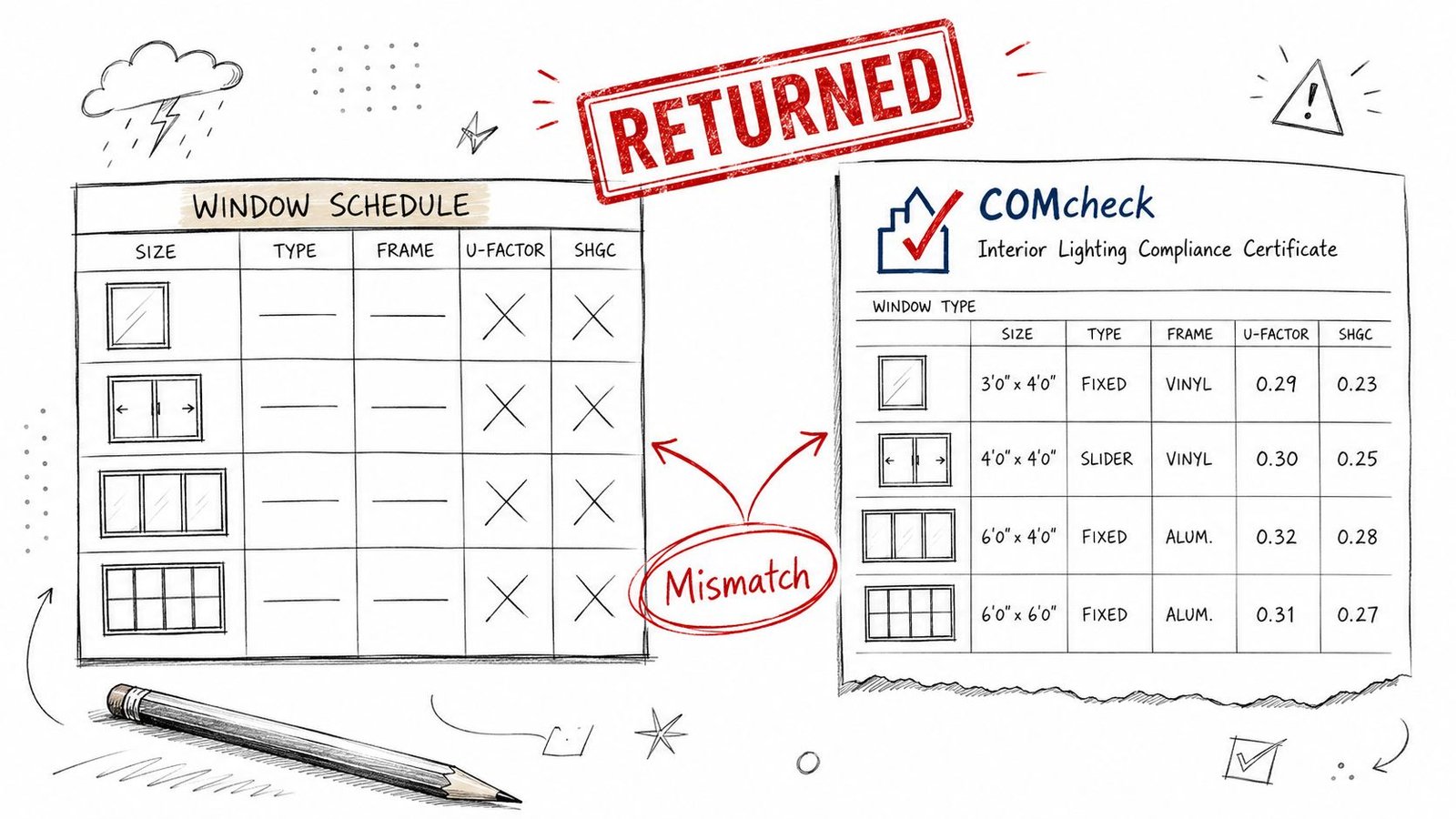
That's the core failure mode. Not bad drafting, but separated data. In production terms, the schedule was treated like a fabrication list while the energy form was treated like a permit form, and nobody forced them to stay in sync.
The mismatch that gets noticed first
A reviewer will usually find the easiest inconsistency first. If the schedule says one thing and the compliance form says another, the rest of the set looks less trustworthy too. Once that happens, the correction is rarely limited to a single line item.
The fix isn't more decoration in the schedule. It's documenting the right performance values in the right place, then keeping those values locked to the energy model and the permit form.
Why Schedules Are a Compliance Document Now
Door and window schedules already function as a production control tool because they centralize the information needed to fabricate, price, order, and install openings, with each entry tied to a unique tag on plans and elevations. That part is standard practice in construction documentation, and it's the reason the schedule exists in the first place. But on energy-reviewed projects, plan checkers now read it as part of the compliance package, not just the order log, which is why door and window schedules have to be treated as controlled documentation.
The schedule is no longer isolated
The schedule row and the energy form row are functionally linked. If one says a window type has a certain thermal value and the other says something else, that's a correction trigger, not a harmless drafting difference. The same is true when a late design change updates the form but leaves the schedule behind.
That shift changes who owns the document. It's no longer just the architect's sheet note problem or the drafter's table cleanup. It's a shared compliance data source that has to match across the sheet set, the energy documentation, and the product basis.
Practical rule: if a tag appears on the elevations, it needs to resolve cleanly in the schedule and the compliance form. If it doesn't, expect a comment.
For broader permit-set context, keep the schedule work aligned with the rest of the energy package, not just the architectural sheets. That's where the coordination discipline matters.
Required Performance Values on the Schedule
A compliant window schedule energy code review starts with performance fields, not dimensions. The schedule has to show the values plan check will compare against the adopted energy documentation, and those values need to be visible enough that nobody has to infer them from a submittal packet. The common fields are straightforward, but they're the fields that cause the most friction when they're missing.
The values that need a home
- U-factor for both doors and windows, because thermal transmittance is part of the compliance conversation for exterior openings.
- SHGC for windows and glazed doors, because solar heat gain is a core energy performance input.
- Visible transmittance where the jurisdiction or project type requires it, especially when the reviewer wants the full performance picture.
The exact thresholds belong to the adopted code edition and climate zone, and those values need to be marked [VERIFY] against the local requirement instead of guessed from memory. That matters because the schedule is often the first place a reviewer looks to see whether the submitted values are anchored to the project basis. A blank cell is one problem. A wrong number is worse.
For a useful exterior-oriented reference on related compliance work, the exterior remodeling energy compliance resource from Superior Home Improvement is a solid reminder that performance documentation is never just a field exercise. The same discipline applies here.
If you're organizing a fenestration schedule requirements checklist, keep the thermal fields visible and intentional. Hiding them in notes is how they get missed when the sheet set gets revised.
Coordinating Schedule Values With the Compliance Form
A permit set gets bounced fast when the door and window schedule says one thing and the compliance form says another. Plan checkers treat that as a document control problem, not a formatting issue. If the schedule and the compliance form are being maintained by different people, or on different update cycles, the package starts drifting as soon as a window type changes mid-design.
Where drift actually happens
The usual failure pattern is easy to spot. The glazing package changes, someone updates the compliance form to match the new product, and the schedule row stays on the old assumption because that sheet was not tied to the same review checkpoint. The result is a visible mismatch between permit documents, and reviewers notice it right away.
The fix is to anchor both documents to the same NFRC-rated performance data and keep the values locked together through revisions. If the tagged opening changes, both the schedule and the compliance form need to change with it. A partial update is how teams end up with a clean-looking sheet set that still fails plan review.
The cleanest coordination rule is blunt. One opening, one source of truth, one change path.
That rule matters because the compliance form is not a separate exercise from the schedule. It is the same performance record expressed in a different format, and any disconnect between the two turns into correction comments, submittal confusion, or product rework later in the job.
Manufacturer data and NFRC labeling
Manufacturer cut sheets are useful, but they are not enough by themselves if the project needs values that can stand up in plan check. The schedule should reflect the same labeled performance values that will be carried on the compliance form, and the source for those values needs to be traceable. If the team is building custom families, the parameters have to be set up carefully so the schedule fields are not hand-edited into something that no longer matches the model or the form. A practical reference for that setup is working with families in Revit, because the family structure often decides whether the data stays consistent or gets broken by a late change.
NFRC labeling matters because it gives the reviewer a recognizable basis for the numbers. If the schedule shows a performance value that cannot be traced back to a labeled product or an accepted alternate, the correction is predictable. The reviewer will ask where the value came from, and the answer cannot be, “it was the last number entered.”
Keep the schedule and the compliance form aligned every time a substitution, alternate, or revised cut sheet appears. That is the point often missed. The schedule is not just a record of what was drawn, it is a compliance artifact, and if the form changes without a matching schedule update, the package stops reading as one coordinated set.
Glazing Area and Orientation Considerations
Energy review doesn't stop at opening performance. Total glazing area and orientation also shape the compliance calculation, which is why the window schedule can't be finalized in isolation from the elevations and glazing takeoff. If the elevation count and the schedule count don't match, reviewers notice, and they usually don't need to dig far to see where the package went loose.
Why the schedule depends on the elevation set
The schedule gives the opening-by-opening breakdown. The elevations show placement, repetition, and orientation. The compliance form pulls both into the larger energy budget. That means the schedule is downstream of the elevations, not parallel to them.
In practical terms, the sheet set needs one consistent view of how many glazed openings exist, where they sit on the building, and what they add up to. If a revised elevation adds or removes glazing, the schedule has to catch up. Otherwise the permit reviewer gets a tag count that doesn't reconcile with the modeled envelope.
This is also where rough-area assumptions can turn into pain. Even when a schedule doesn't carry explicit orientation columns, the implied cross-check still exists. If the total glazed openings by direction on the elevations don't square with the schedule, the correction comes back.
Manufacturer Data and NFRC Labeling
The performance values in the schedule need a defensible source. Typical numbers and in-house estimates are not enough when the submittal has to survive review. The values should trace back to the specified product line, ideally through NFRC-rated documentation or the manufacturer's current performance data sheet, because that's what gives the schedule weight when someone asks where the number came from.
Why placeholder values are a risk
A placeholder can look harmless during drafting. It becomes a problem when the product selection changes, or when the submittal reviewer asks for substantiation and the team can't show the basis for the number in the schedule. Once that happens, the issue isn't just a schedule edit. It's a compliance credibility problem.
That's especially true in a market where these products are specification-sensitive at scale. The U.S. windows and doors market was estimated at USD 27.71 billion in 2023 and is projected to reach USD 35.03 billion by 2030 according to ConsumerAffairs, which is one reason product-level performance data has to stay tight from design through submittal. A schedule that floats above the actual product selection doesn't hold up well once the details get checked.
For model-based coordination, keep the schedule tied to the product family and not to a generic placeholder. The window glazing and glass discussion is useful if your team needs to think through where the performance basis is really coming from, and the same logic applies to family-level documentation discipline.
Submittal rule: if the product isn't defensible, the schedule isn't defensible.
The same applies to doors with glazing. If the selected assembly carries the performance, the schedule has to carry that same performance, not an approximation.
What a Compliant Schedule Should Include
A compliant door schedule construction documents package needs to do more than identify an opening. It has to give the reviewer enough information to verify performance, trace the product basis, and match the schedule to the compliance form without ambiguity. That's the minimum bar, not the luxury version.
Copy this checklist into your QA template
- Mark or tag, tied to the plan symbol and the same identifier used on elevations.
- Door or window type, so the reviewer can see which openings are grouped and which are unique.
- Nominal and rough-opening dimensions, because fabrication and installation depend on both.
- Frame and material, since thermal and installation assumptions follow the product construction.
- U-factor, for the thermal performance comparison.
- SHGC, for windows and glazed doors where solar gain is part of the submission.
- Visible transmittance, where the project or jurisdiction needs it.
- Fire rating, where applicable.
- Hardware set or glazing specification, when those items affect code or procurement.
- Egress compliance notes, where applicable and relevant to the opening.
That list lines up with the fields industry guidance consistently treats as core schedule data, including unique mark, type or style, dimensions, frame or sash material, glazing specification, finish, hardware set, and performance ratings such as fire resistance, acoustic STC, or thermal metrics like U-value and SHGC as summarized in this blueprint documentation guide.
If you want a practical comparison point for rating language, the Atomic Exteriors window rating guide is a useful companion reference when your team is checking how the performance numbers get presented to clients and reviewers. The schedule should reflect the specified product, not a placeholder assumption.
For teams building the table in Revit, the trick is not making the schedule exist. It's making the fields survive revision without losing the compliance basis. The Revit window schedule topic is helpful if your internal workflow needs that level of field discipline.
Common Mistakes That Trigger Energy Code Corrections
The corrections are usually predictable. They're not glamorous, but they're avoidable if someone checks the schedule against the compliance form before issue.
- Missing U-factor or SHGC values. The schedule reads like a takeoff, not a compliance document, and plan check sends it back.
- Values that don't match the compliance form. The reviewer sees drift between documents and asks for reconciliation.
- Placeholder or estimated performance data. The schedule lacks a defensible product basis, so the numbers can't be trusted.
- Glazing count that doesn't match the elevations. The opening count looks inconsistent, which raises questions about the whole envelope set.
- Missing fire rating or egress fields where applicable. The schedule fails to show code-critical information that should have been obvious.
- Finalizing the schedule before the energy form. The documents diverge during later edits, and the mismatch shows up at review.
One missed field can cost a full resubmission cycle. That's why energy code compliance documentation has to be treated as a coordination task, not a last-pass cleanup.
How BIM Heroes Coordinates This With Every CD Set
BIM Heroes coordinates door and window schedules with energy code documentation as part of commercial and residential CD sets, so the schedule stays aligned with the compliance form and the product data that supports it. The point is simple, first-pass clarity, fewer mismatches, and a cleaner submittal trail.
If your team wants that level of schedule control built into the documentation pipeline, BIM Heroes can help with the coordination work that keeps permit sets moving.